 Luxe Themes
Best Ghost Themes: Premium and Free, Compared
The best Ghost themes for newsletters, magazines, blogs and membership sites, free and premium: what each kind of publication needs and when free is enough.
The best Ghost theme is the one built for the way you publish. A newsletter needs a signup form where readers land and a clean post page that matches the email. A magazine needs sections and a front page that changes daily. A membership site needs pricing and sign-in pages that look like the rest of the site. Most theme regrets come from choosing on looks alone and finding out later that the theme does not have the pages you need.
This guide compares Ghost’s free official themes with our own premium themes, by publication type. It explains what you give up with a free theme, and ends with how to check a theme before you commit. If you would rather see Ghost in use first, the Ghost website examples roundup shows real publications built on it and what each does well.
What separates a good Ghost theme from an adequate one
Every Ghost theme handles the basics: responsive layout, post and page templates, tag and author archives, and Ghost’s built-in Portal for signups. Search is built into Ghost too, so any current theme can offer it. The differences show up in four places.
Layout choice. A theme with one post layout means every article opens the same way. Themes with several layouts let a photo essay open full-bleed and an opinion piece open with plain text.
Membership pages. Ghost provides Portal, a pop-up for signups and account management. It does not provide a pricing page, a sign-in page or an account page that match your design. Themes that ship those pages make paid membership feel like part of the site rather than a bolt-on.
Interface language. A theme’s buttons and labels stay in English unless the theme ships translations; Ghost translates dates on its own, from the site language setting. Publications in other languages need a theme with locale files for their language, and right-to-left scripts need a theme that flips the layout.
Settings without code. Modern themes expose colours, fonts, homepage sections and feature toggles as design settings in Ghost admin. Older themes expect you to edit template files for the same changes.
Free official Ghost themes
Ghost makes and maintains a set of free themes and keeps them current as Ghost changes. They are the safest starting point, and for many publications they are the finishing point too.
| Publication type | Official themes |
|---|---|
| Magazine and news | Source, Casper, Headline, Dope, London, Ruby |
| Newsletter | Dawn, Journal, Digest, Bulletin |
| Personal blog | Solo, Edition, Alto, Taste |
| Podcast | Episode, Wave |
| Photography | Edge |
| Documentation | Ease |
Source is the current default and the most flexible of the set, with a homepage that adapts to news, magazine and newsletter use. Casper was the default for years, so a great many Ghost sites still run it. That is also its weakness if you want a site that does not look like the others.
Premium Ghost themes from Luxe
Other developers sell good premium themes too, and the checks near the end apply to any of them. Ours are built for content-first publishers and managed entirely from Ghost admin, and each one is designed around a kind of publication rather than as a general template.
| Theme | Price | Built for |
|---|---|---|
| Senna | $89 | Writers, newsletters and small magazines where the words come first: a warm paper ground, serif headlines and a sidebar that stays beside your work |
| Tribune | $89 | Newspapers and multi-author magazines that publish several stories a day: a front page of lead stories, a featured list and sections by topic |
| Homa | $69 | Magazines with steady sections and several writers: featured stories beside the latest, then a section for every topic you name |
| Rune | $89 | Digital magazines where an editor decides what goes on top: a cover welcome, latest stories, editor’s picks and the team |
| Luno | $89 | Travel, lifestyle and product blogs whose readers expect an app-like interface: fixed sidebar menu, search a keystroke away |
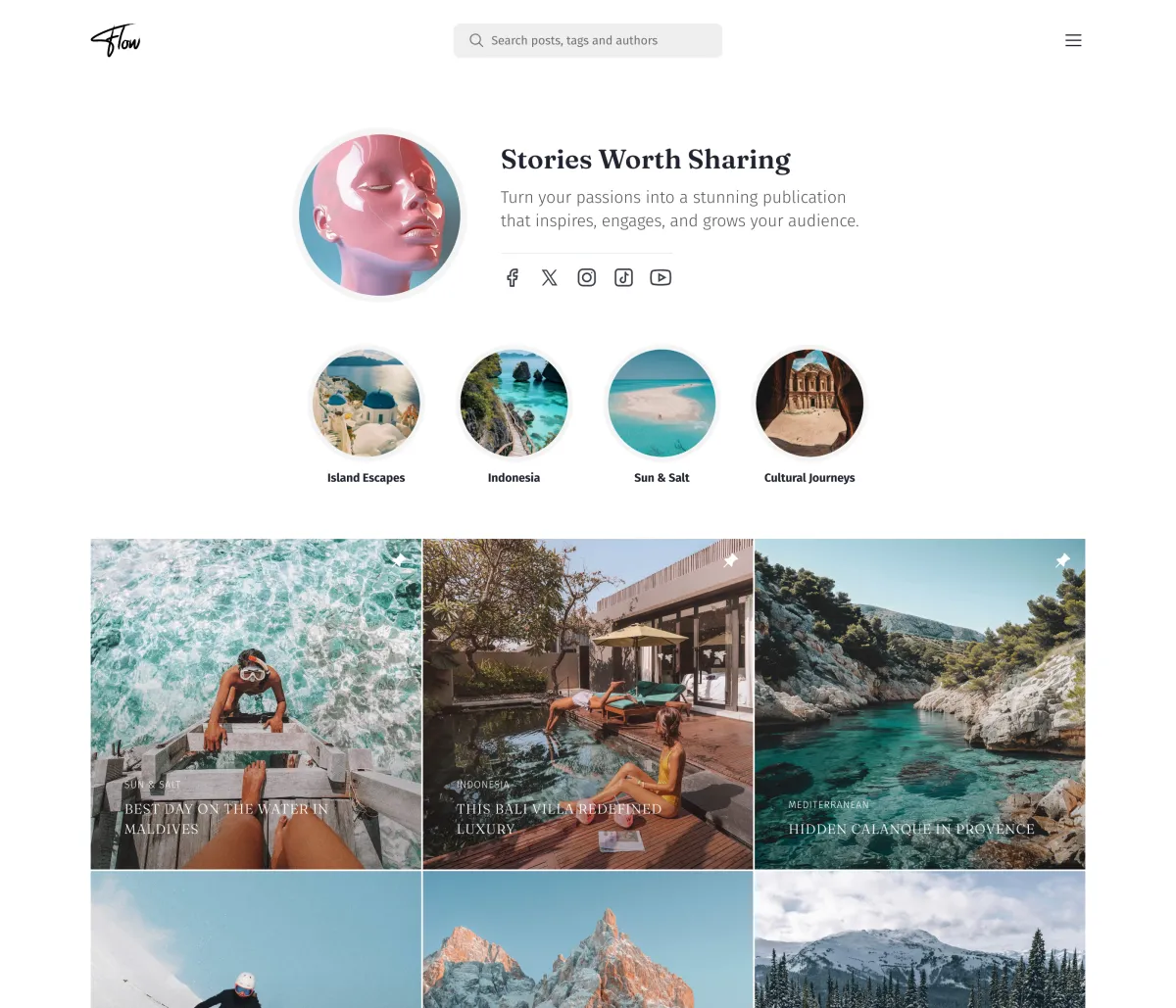
| Flow | $89 | Creators and communities whose readers arrive from social media: a profile-style top, round topic highlights and a square post grid |
| Nio | $69 | Studios, portfolios and design blogs: every post card in the same square frame, so mixed pictures stay in order |
| Reru | $89 | Magazines, studios and personal archives with a lot to look at: a slim icon rail and images laid out at their own shape |
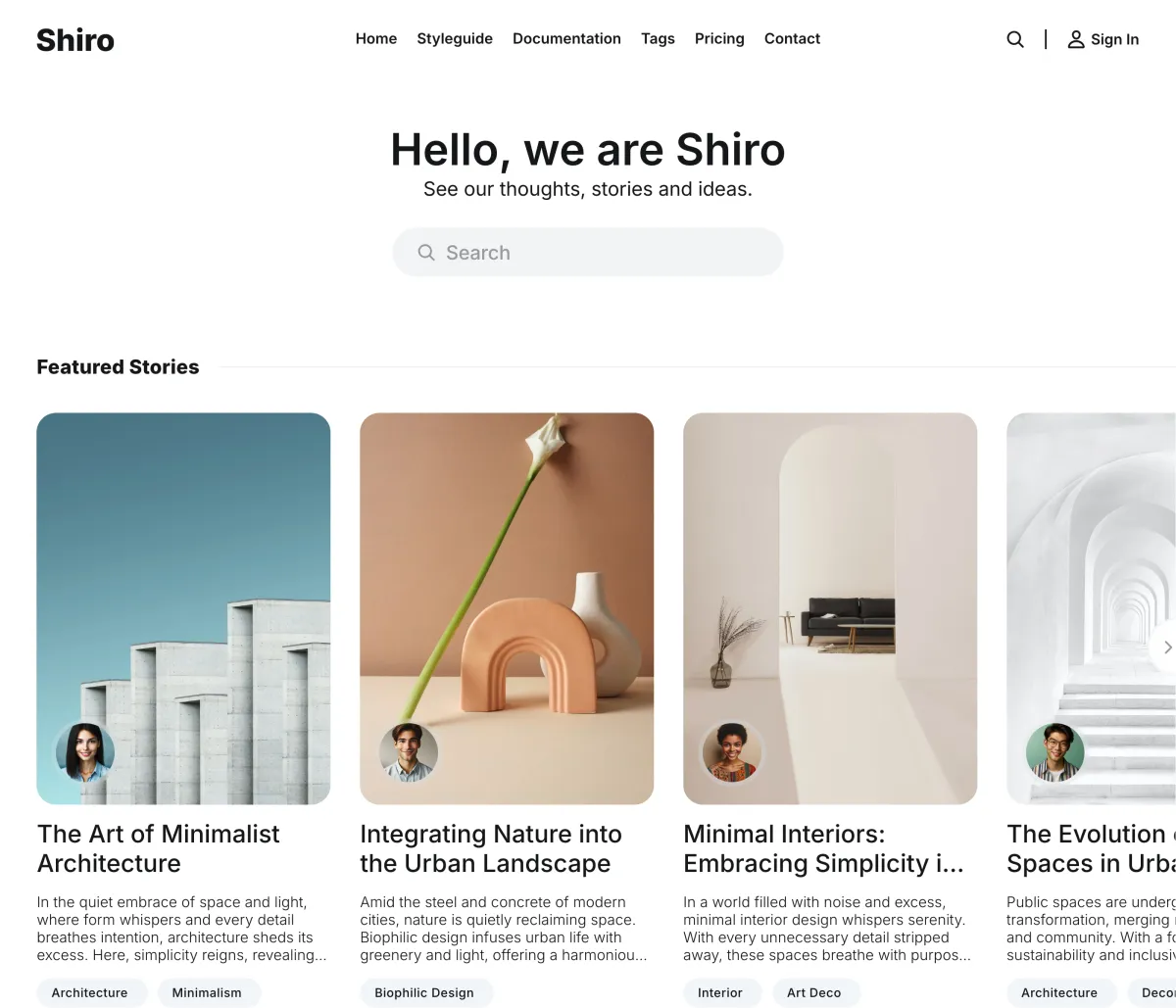
| Shiro | $149 | Minimal magazines and archives that readers search rather than browse: a large search field at the heart of the homepage, nine post layouts and seven colour schemes |
All of them include dark mode, interface translations and design settings in Ghost admin. They differ in navigation, homepage structure, membership pages and right-to-left support, and the catalogue of every Luxe Ghost theme shows them side by side. The pages for magazines, newsletters, tech blogs and writers narrow the list further.
The best theme by publication type
Newsletters
What matters: a signup form where readers land, a post page that reads like the email, and a subscribe prompt that follows the reader without nagging.
Free: Dawn or Journal. Premium: Senna, which keeps the subscribe button in a sidebar beside the writing, or Flow if your readers come from social profiles.
Magazines and news
What matters: a front page with several stories at once, sections by topic, more than one post layout, and search.
Free: Source or Headline. Premium: Tribune for a newspaper front page, Homa for topic sections with several writers, Rune when one editor curates the top of the page.
Personal blogs
What matters: typography, reading comfort, a homepage that does not need daily updates to look alive.
Free: Solo or Edition. Premium: Nio for image-led writing, Luno for a sidebar and search-first interface.
Membership publications
What matters: pricing and sign-in pages in your design, clear tier display, and a members-only treatment for gated posts that still invites a signup.
Free themes rely on Portal for all of this. Premium: Shiro, Luno, Senna, Tribune, Flow and Reru ship their own pricing, sign-in and sign-up pages, and Shiro adds an account page. Rune ships a pricing page.
Publications in other languages
What matters: translated interface text in your language, and a layout that flips for right-to-left scripts.
Ghost’s official themes now ship interface translations for around 15 languages. Premium: every Luxe theme ships translations for 46 or more; Flow, Reru, Tribune and Nio also flip the layout for right-to-left scripts.
Photography and portfolios
What matters: image sizing that keeps a page of mixed photos orderly, lightbox viewing, and a grid that does not crop your work unpredictably.
Free: Edge. Premium: Nio for a uniform square grid, Reru for images at their own shape.
Free versus premium: what you give up
| Free official themes | Our themes | |
|---|---|---|
| Post layouts | One on most; Dawn, Edition and Headline add feature-image variants | Several on every theme, chosen per post |
| Colour schemes | An accent colour, plus a background colour or a light and dark switch on some | Light and dark on every theme; several palettes on Senna and Shiro |
| Membership pages | Portal pop-up only | A pricing page on most, usually with sign-in and sign-up pages |
| Interface languages | Around 15 | 46 or more; right-to-left layouts on some |
| Table of contents, reading progress | Not included | Reading progress on every theme; table of contents on some |
| Support | Ghost’s forum and help docs, plus email support on Ghost(Pro) | From us by email |
| Updates | Maintained by Ghost | From us, for life |
Free themes are the right choice while you are finding out whether the publication will stick. Premium themes earn their price once your brand, membership revenue or a multilingual audience is on the line. The free versus premium comparison goes deeper on the trade-off.
How Ghost themes work
A Ghost theme is a folder of Handlebars templates plus a package.json file that names it. Only two templates are required, index.hbs for the homepage and post.hbs for posts; everything else is optional and adds behaviour. You upload the theme as a zip file under Settings → Site → Theme, and Ghost checks it for errors before you can activate it.
Two practical consequences. First, switching themes does not touch your content, members or site settings, so trying a theme is low risk; only the new theme’s own design settings start from their defaults. Second, your hosting decides what you may upload: Ghost(Pro)‘s Starter plan does not allow theme uploads, Publisher and higher plans do, and self-hosted Ghost accepts any valid theme.
Before you buy: four checks
- Open the demo on your phone. Most reading happens there, and a demo that only impresses on a wide screen is a warning.
- Find the membership pages. If you plan to charge, look for pricing and sign-in pages in the demo, not just a subscribe button.
- Read the documentation before the checkout page. Good documentation shows every setting; thin documentation predicts thin support.
- Check the Ghost version it was tested on. Ghost adds features often, and a theme that has not been updated in a year will miss some of them.
Where this leaves you
If a free official theme covers your publication type, use it and spend your energy on writing. If you need layouts, membership pages or design choices that the free set does not offer, go premium, and choose the theme built for your kind of publication rather than the one with the longest feature list. The Ghost themes catalogue puts ours side by side, each with a live demo and its documentation.
Frequently Asked Questions
What is the best Ghost theme?
Are free Ghost themes good enough?
How much do premium Ghost themes cost?
Can I use any theme on Ghost(Pro)?
Keep reading
Free vs Premium Ghost Themes: Worth It?
Is a premium Ghost theme worth paying for? What free themes handle well, what breaks as a site grows, and exactly what the upgrade buys, compared plainly.
How to Choose a Ghost Blog Theme
Your Ghost theme defines your reader experience. Learn what to look for in layouts, performance, membership support, and design customization.
Ghost Website Examples: 12 Real Sites on Ghost
Twelve real Ghost sites, including 404 Media, Platformer, Tangle, Buffer, Duolingo and Troy Hunt, with what each does well and how to build the same on Ghost.
Email Newsletter Design: A Practical Guide
Design a newsletter people actually read: layout, typography, color, dark mode and images, plus how Ghost's built-in email design settings handle each one.
Comparing options? Browse all premium Ghost themes side by side.
Explore all premium Ghost themes
The complete Luxe Themes bundle: every theme, one purchase.