 Luxe Themes
How to Choose a Ghost Blog Theme
Your Ghost theme defines your reader experience. Learn what to look for in layouts, performance, membership support, and design customization.
Your Theme Is Your Brand
Every Ghost publication starts with a theme choice. This decision shapes how readers experience your content — first impressions, reading comfort, navigation, and whether someone stays to subscribe or bounces after 3 seconds. For a sense of what finished sites look like across niches, browse our Ghost website examples.
Ghost’s theme ecosystem includes more than a dozen free official themes and dozens of premium options from independent developers. This guide helps you evaluate what matters for your specific publishing goals.
What to Evaluate in a Ghost Theme
1. Post Layouts
How your articles are presented is the most visible design decision. Most free themes offer one post layout, though Dawn, Edition and Headline add a few post templates. Premium themes offer 3-9 options:
- Default: Standard header image above title
- Text-first: Title and excerpt before any images (good for long-form writing)
- Full-width image: Edge-to-edge featured image (good for photography)
- Split layout: Image on one side, text on the other
- No image: Clean text-only presentation
- Background image: Title overlaid on the featured image
Different content types deserve different presentation. A photo essay benefits from full-width images. A technical analysis benefits from text-first layout. A theme with only one layout forces every article into the same mold. (Layouts are picked per post from the settings panel — see the Ghost editor guide for how post settings, cards, and formatting fit together.)
2. Homepage Design
Your homepage is the highest-traffic page. Evaluate:
- Hero section: Does the theme highlight your best content above the fold?
- Featured posts: Can you pin important articles to the top?
- Post grid/list: How are posts displayed? Grid view? List view? Magazine layout?
- Newsletter signup: Is there a prominent signup form on the homepage?
- Navigation: Clear menu structure? Dropdown support? Tag-based navigation? A theme without dropdowns can get them from a dropdown menu snippet.
3. Dark Mode
Dark mode is now a reader expectation. Evaluate whether the theme includes:
- Light and dark color schemes
- System preference detection (auto-switches based on OS setting)
- Manual toggle for reader control
- Consistent dark mode across all page types (homepage, posts, membership pages)
A few free themes include dark mode, such as Casper, Dawn and Alto. Premium themes typically include it as a standard feature.
4. Membership Pages
If you monetize with Ghost memberships, your theme needs custom membership pages:
- Sign-up page: Branded page showing your membership tiers and pricing
- Sign-in page: Clean login page matching your site design
- Account page: Where members manage their subscription, newsletter preferences, and payment
Ghost’s default Portal modal works as a fallback, but custom membership pages convert better because they match your brand and provide space to explain the value of each tier.
5. Performance
Page speed directly affects reader experience and SEO rankings. Check:
- PageSpeed Insights score: Run the theme demo through Google PageSpeed Insights
- Core Web Vitals: LCP (Largest Contentful Paint), CLS (Cumulative Layout Shift), INP (Interaction to Next Paint)
- Image optimization: Does the theme use lazy loading and modern formats?
- Code weight: Minimal JavaScript and CSS for fast load times
Some premium themes target PageSpeed 100 across all categories. Heavy themes with excessive JavaScript can hurt rankings.
6. Internationalization
If your audience reads languages other than English:
- Translation files: Does the theme include
.jsonlocale files? - RTL support: Right-to-left layout for Arabic, Hebrew, and Persian
- Language coverage: How many languages are pre-translated?
This matters more than most publishers realize. A theme without i18n requires manual translation in Handlebars template files — time-consuming and error-prone.
7. Search
Ghost includes built-in search that any current theme can use. What differs is whether the theme gives it a visible place, such as a search button in the header, so readers know it is there.
For publications with dozens or hundreds of posts, search is essential. Some premium themes add their own search panel, styled to match the design. Ghost’s free official themes use the built-in one.
8. Support and Updates
Consider the long-term:
- Update frequency: Is the theme actively maintained?
- Ghost version compatibility: Does it support the latest Ghost release?
- Support channel: Email support? GitHub issues? Forum only?
- Documentation: Setup guide? Configuration instructions?
Free themes have community-only support. Premium themes include dedicated developer support (typically 6-12 months).
Theme Categories
For Newsletter Publications
Newsletter-focused themes prioritize signup forms, clean reading experiences, and email consistency.
Key features: prominent signup CTAs, minimal distractions, reading-focused post layouts, consistent design between web and email.
Good choices: Dawn (free), Rune ($89), Flow ($89).
For Magazine-Style Publications
Magazine themes handle high content volume with organized navigation and category-based browsing.
Key features: multiple post layouts, tag/category navigation, featured post sections, sidebar options, grid layouts.
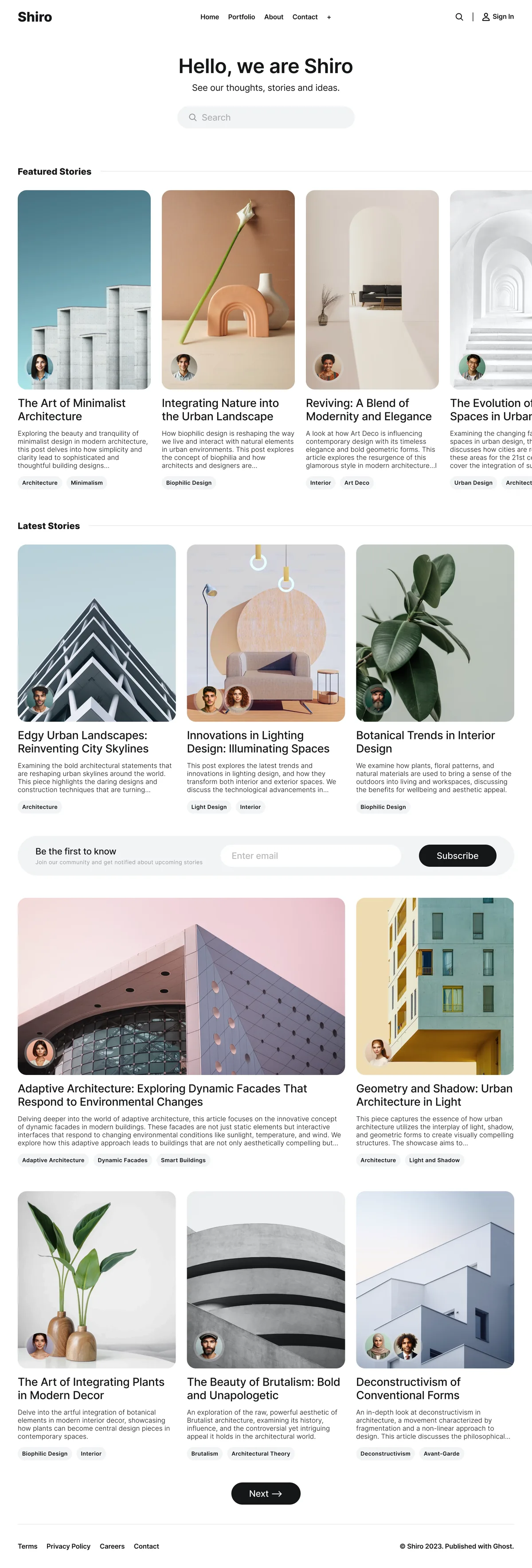
Good choices: Source (free), Shiro ($149), Edition (free).
For Membership Publications
Membership themes prioritize conversion pages and tier-based content presentation.
Key features: custom sign-up and sign-in pages, pricing table layouts, content preview with paywall cards.
Good choices: Luno ($89), Shiro ($149).
For Personal Blogs
Personal blog themes are minimal, focusing on typography and the writing itself.
Key features: clean typography, author bio sections, minimal navigation, reading-focused design.
Good choices: Solo (free), Nio ($69), Homa ($69).
The Ghost(Pro) Theme Restriction
An important caveat: Ghost(Pro) Starter ($15/month, annual) limits you to official free themes. Custom and premium themes require the Publisher plan ($29/month) or higher.
If you plan to use a premium theme, factor the Publisher plan cost into your decision. The $14/month upgrade from Starter also unlocks paid memberships, custom sending domains, and advanced analytics — so the theme restriction is not the only reason to upgrade.
How to Install a Ghost Theme
- Purchase or download the theme (delivered as a
.zipfile) - In Ghost Admin, go to Settings → Site → Theme
- Click Upload theme and select the
.zipfile - Ghost validates the theme using GScan (catches compatibility issues)
- Click Activate to make it live
- Configure theme settings in Settings → Design & branding
Most premium themes include detailed setup documentation covering configuration options, content organization, and customization.
Our Recommendation
Start with your publishing goals, not aesthetic preferences:
- What is your primary content type? (Newsletter, magazine, blog, membership publication)
- Do you need paid memberships? (If yes, prioritize custom membership pages)
- Is your audience international? (If yes, prioritize i18n and RTL support)
- What is your budget? (Free themes work for starting; $69-149 covers premium needs)
Then evaluate 2-3 themes against the checklist above. Use the live demo to test navigation, post layouts, and membership flows before purchasing — you can browse all Ghost themes in our collection with their features listed in one place.
Where this leaves you
You have a checklist, a way to test a theme against it on the live demo, and a sense of what a theme cannot fix. Our Ghost themes are built around that checklist, and the pages for magazines, tech blogs, newsletters and writers narrow the choice to the ones that fit each kind of publication.
For free and premium picks by kind of publication, see our best Ghost themes guide.
Frequently Asked Questions
How do I choose the right Ghost blog theme?
What should I look for in a Ghost theme?
What is the difference between free and premium Ghost themes?
How do I install or change a Ghost theme?
Keep reading
Best Ghost Themes: Premium and Free, Compared
The best Ghost themes for newsletters, magazines, blogs and membership sites, free and premium: what each kind of publication needs and when free is enough.
Free vs Premium Ghost Themes: Worth It?
Is a premium Ghost theme worth paying for? What free themes handle well, what breaks as a site grows, and exactly what the upgrade buys, compared plainly.
Ghost Website Examples: 12 Real Sites on Ghost
Twelve real Ghost sites, including 404 Media, Platformer, Tangle, Buffer, Duolingo and Troy Hunt, with what each does well and how to build the same on Ghost.
Email Newsletter Design: A Practical Guide
Design a newsletter people actually read: layout, typography, color, dark mode and images, plus how Ghost's built-in email design settings handle each one.
Recommended Themes
Themes with at least one of the features this guide touches: dark mode, multiple post layouts, membership pages and SEO optimization.
Senna
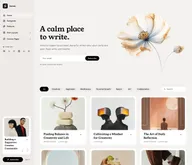
Strongest hereSenna is writing on paper. A warm paper ground, white cards resting on it and a serif carrying the headlines, with the navigation in a sidebar that stays beside your work instead of above it. Built for writers, newsletters and small magazines where the words come first, and managed entirely from Ghost admin.
Tribune
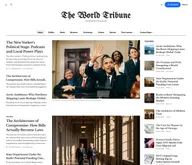
Strongest hereTribune is the front page of a newspaper. Lead stories beside the day's picture, a Featured list at the edge, then your sections by topic, each in its own layout, under a masthead that folds away as the reader scrolls. Built for newspapers and multi-author magazines that publish several stories a day, and managed entirely from Ghost admin.
Luno
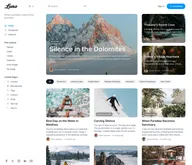
Strongest hereLuno is a blog that works like an app. A menu that stays open in a fixed sidebar, search a keystroke away, a light and dark switch beside your logo, and a homepage that opens with three featured stories as cover cards. Built for travel, lifestyle and product blogs whose readers expect an interface they already know, and managed entirely from Ghost admin.
Flow
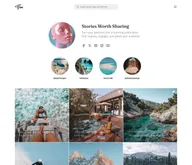
Strongest hereFlow is a profile page for a creator. Your photo, a line about you and your links at the top, a row of round highlights for your topics, and your posts as a square grid, edge to edge. The menu waits behind one button so nothing competes with the pictures. Built for creators and communities whose readers arrive from social media, and managed entirely from Ghost admin.
Rune
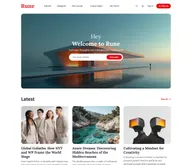
Strongest hereRune is an editor's front page. A cover-image welcome with one thing to do, then the latest stories, your Editor's Picks as tall cover cards, one topic you highlight, and the team behind it. Built for digital magazines where someone decides what goes on top, and managed entirely from Ghost admin.
Nio
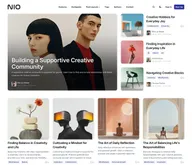
Strongest hereNio is a grid of squares. One featured story as a large photo card, then your posts as square cards four across, a band for the topic you highlight, and a row of your authors. Every image sits in the same frame, so a page of mixed pictures stays in order. Built for studios, portfolios and design blogs, and managed entirely from Ghost admin.
Shiro
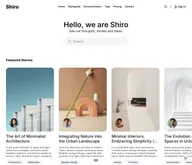
Strongest hereShiro starts with a search. Your name, one line, and a search field where a hero usually goes, then your featured stories as portrait cards, in one of seven color schemes. Nine ways to open a post and membership pages inside the theme. Built for minimal magazines and archives that readers search rather than browse, and managed entirely from Ghost admin.


Comparing options? Browse all premium Ghost themes side by side.
Get every theme in one bundle
The complete Luxe Themes bundle: every theme, one purchase.