 Luxe Themes
Ghost Mailchimp Integration: Four Ways That Work
Ghost has no built-in Mailchimp integration, but four routes work: an embedded signup form, Zapier sync, RSS-to-email, and a CSV import we tested ourselves.
Quick answer: Ghost has no built-in Mailchimp connection. Four things work. You can put a Mailchimp signup form on your Ghost site, keep the two lists in sync with Zapier, or let Mailchimp email your Ghost posts through its RSS feature. Or you can move your Mailchimp audience into Ghost from a CSV file. Most publishers who ask this question end up needing only the last one, because Ghost sends newsletters on its own.
You publish on Ghost, or you are about to, and your email list lives in Mailchimp. The two tools don’t know about each other. The question is how to make them cooperate, or whether to stop running both.
This guide explains what each option does, how to set it up, and what you give up with it. It ends with what we’d choose in the common situations. We checked the Mailchimp and Ghost documentation for each option in September 2026, and we ran the import on one of our own sites.
What a Mailchimp integration usually means
Nobody wants an integration for its own sake. People who ask about Ghost and Mailchimp usually want one of four things:
- A Mailchimp signup form on a Ghost site. Readers subscribe, and the address lands in Mailchimp. That is option 1.
- Ghost members and the Mailchimp audience kept in sync. Someone joins on one side and appears on the other. That is option 2.
- Mailchimp keeps sending, Ghost does the publishing. New posts go out as Mailchimp campaigns. That is option 3.
- Leaving Mailchimp. The list moves into Ghost and Mailchimp is switched off. That is option 4.
Ghost’s own integrations directory describes the same four routes. There is no hidden fifth one.
Decide first whether you need Mailchimp at all
Ghost is a publishing platform with email built in. When you publish a post, you choose whether it goes to the web, to subscribers’ inboxes, or both, in the same step. You can run several newsletters from one site, and send to a segment: free members, paid members, a tier, or a label. Paid memberships run through Stripe, and Ghost takes no cut of what your readers pay. On Ghost(Pro), email sending is included with no send limit. On a self-hosted site you connect a sending service first, which our guide to Ghost newsletters without Mailgun covers.
Mailchimp is priced by the size of your audience, and unsubscribed contacts count toward that size. We checked Mailchimp’s help pages on this in September 2026.
So if the reason you keep Mailchimp is “it sends my posts to my list”, Ghost already does that. Option 4 is the whole project, and one monthly bill goes away. The Ghost newsletter guide covers the setup.
Mailchimp still earns its place in some situations. Its automations can send a sequence of emails based on what someone clicked or bought, and Ghost has only welcome emails and simple sequences for new members. Its e-commerce features connect to a store. And if a team already lives in Mailchimp, moving them mid-campaign is a cost in itself. In those cases, run both, and pick from the options below.
Option 1: A Mailchimp signup form on your Ghost site
This is the least invasive connection. Mailchimp gives you a block of HTML. You place it on your Ghost site, and when a reader fills it in, the form sends their address straight to Mailchimp. Ghost never sees the signup.
In Mailchimp, the form builder lives under Forms, then Other forms. Create a new form, choose Create embedded form, name it, pick the audience, and continue to the builder. When you are happy with the fields, continue and copy the code.
In Ghost, there are two places to put it:
- On one page or post. In the editor, type
/htmlto add an HTML card, and paste the code into it. - On every page. Go to Settings → Code injection and paste the code into Site footer. Our code injection guide explains what else that box can do.
The trade-off is that these subscribers exist only in Mailchimp. They are not Ghost members, so they cannot read member-only posts or buy a paid tier until you import them later. And your site will still show Ghost’s own signup, because the theme and Portal, Ghost’s signup and account window, both point at Ghost’s member list. If Mailchimp is to be the only list, hide the floating Portal button and remove the theme’s signup forms.
This option is right when Mailchimp must remain the list of record and you are not selling memberships. It is wrong for anything that involves paying readers.
Option 2: Keep Ghost and Mailchimp in sync with Zapier
Zapier is a service that watches for an event in one app and performs an action in another. Ghost ships with a Zapier integration, under Settings → Integrations in Ghost admin.
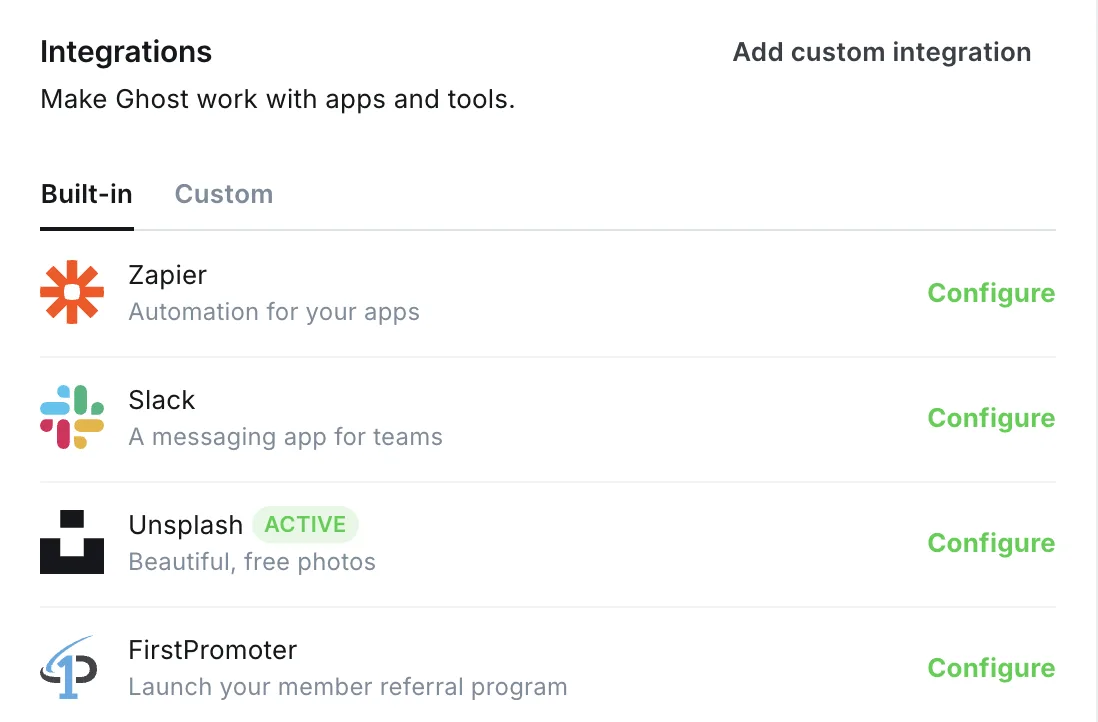
Zapier’s Ghost app can react when a member is created, updated or deleted, and it can create or update a member. Its Mailchimp app can react to a new subscriber or a new unsubscriber, and it can add, update or unsubscribe a contact. Three combinations cover most needs:
| When this happens | Zapier does this |
|---|---|
| A member joins in Ghost | Adds them to your Mailchimp audience |
| Someone subscribes in Mailchimp | Creates a member in Ghost |
| Someone unsubscribes in Mailchimp | Updates the member in Ghost so they stop receiving newsletters |
To set it up, open the Zapier integration in Ghost admin and click Configure. Ghost shows an API key and a URL that Zapier’s Ghost app asks for when you connect it. Treat that key like a password. Then, in Zapier, choose the trigger app, connect the action app, map the email and name fields, and test with one contact before turning it on.
Three limits are worth knowing before you rely on it:
- Each connection runs one way. Two-way sync means at least two connections, and unsubscribes need their own.
- Ghost’s “member updated” event covers any change to a member, not only newsletter changes. If you use it to mirror unsubscribes, add a filter step in Zapier so only newsletter changes go through.
- Zapier only sees new events. Contacts who existed before you connected it are not copied. Do a one-time import first, as in option 4, and let Zapier keep things current from then on.
Zapier’s free plan covers a small number of tasks a month. A site with steady signups will need a paid plan, so the sync has its own running cost.
This option is right while you genuinely run both tools, for example during a transition where Mailchimp’s automations are still doing work. Once the transition ends, switch it off.
Option 3: Let Mailchimp email your Ghost posts
Every Ghost site publishes an RSS feed, a machine-readable list of your latest posts, at your site address followed by /rss/. Mailchimp can watch that feed and send new posts to your audience on a schedule. Ghost does the publishing; Mailchimp does the sending.
In Mailchimp, the feature is an automation. Go to Automations, open the flow templates, and choose Share blog updates via RSS. Give it your feed address and pick a rhythm: daily, weekly on a chosen day, or monthly. Mailchimp only sends when there is something new in the feed, and it sends at most once a day. A post needs to be live for about three hours before the scheduled send to be included.
Ghost’s feed contains what a logged-out visitor could read, so member-only posts appear only up to the point where the paywall begins. Readers who want the rest come to the site, which is the point of a paywall.
The trade-off is design and data. The email uses Mailchimp’s template, not the look of your post, and your open and click numbers live in Mailchimp rather than in Ghost’s dashboard. Your readers also stay Mailchimp contacts, with everything option 1 said about that.
This option is right when Mailchimp stays your sender and you only moved the website to Ghost. It is a reasonable long-term setup for a free newsletter, and a poor one for a paid publication.
Option 4: Move your Mailchimp audience into Ghost
If you are consolidating on Ghost, move the list once and be done. The whole job is one export, a little tidying, and one import. We did it on one of our own sites while writing this.
Start with consent. Ghost expects a list of people who agreed to hear from you. Mailchimp separates contacts into subscribed, unsubscribed, non-subscribed and cleaned. Only the subscribed ones come across. Importing the others means emailing people who asked you not to, which harms your sending reputation and, in most countries, breaks the law.
Export from Mailchimp. Open Audience, choose the audience if you have more than one, and click Export audience, then Export CSV. Mailchimp emails you when the file is ready. The download is a ZIP with a separate CSV for each contact type, which makes the consent step easy: use the file of subscribed contacts and ignore the rest. The export includes names, tags and notes. It does not include opens or clicks, so that history stays behind.
Import into Ghost. In Ghost admin, open Members, click the settings icon at the top right, and choose Import members. If your member list is still empty, the same option appears as Import with CSV on the page itself. Select the file. Ghost reads the column names and asks what to do with each one.
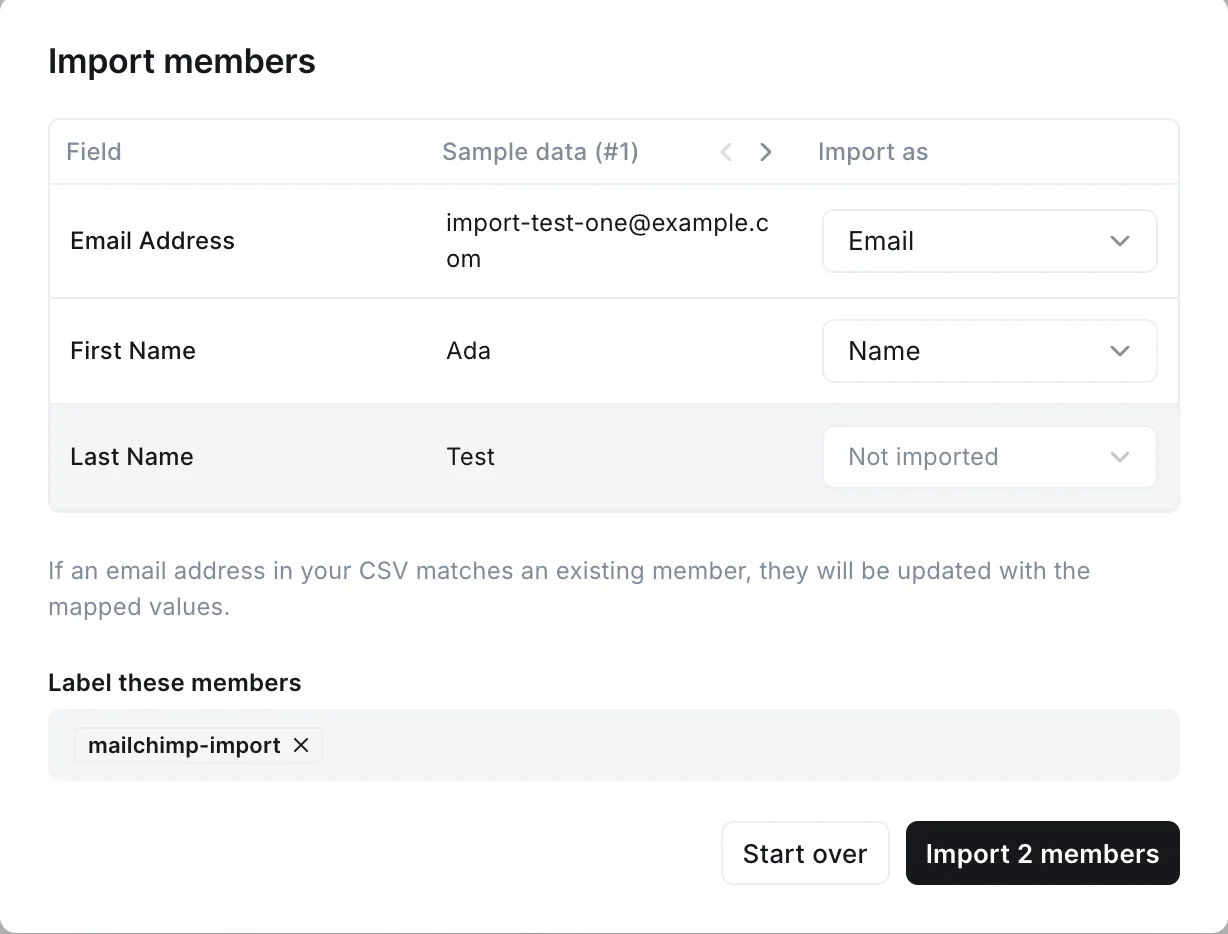
Mailchimp’s Email Address column maps to Email and First Name to Name. Ghost has a single name field, so if you want full names, combine the two Mailchimp columns in a spreadsheet before importing. Mailchimp’s tags column can be mapped to Labels; check a few members afterwards to confirm they came through as you expect. Under Label these members, type a name such as mailchimp-import to mark the whole batch. Ghost also attaches its own dated label to every import, so you can find the batch later even if you skip this step.
Then import. In our test, two contacts appeared in the member list within a few seconds, with the label attached. If an address already exists as a member, Ghost updates that member rather than creating a duplicate. The import dialog says so itself, and it means you can safely run the import twice.
One setting matters for what happens next. Ghost’s import documentation explains that imported members are subscribed to any newsletter that has “subscribe new members on signup” turned on, unless your file says otherwise. If you would rather import quietly and invite people later, either turn that setting off first or add a column to the file:
email,name,subscribed_to_emailsreader@example.com,Ada,falsePaid subscriptions do not travel, because Mailchimp does not run them. If you charged readers elsewhere, set up your tiers in Ghost with the Stripe connection and invite people to upgrade from their new account.
This option is wrong if you plan to keep both tools running for a long time. Two lists that were equal on import day drift apart from the next signup on. Do the import once you have decided to leave Mailchimp, and use option 2 in the meantime.
After the import, send a first post from Ghost that says what changed and why. A few people will unsubscribe, as they do after any move. The rest are now on a list you fully own. For the broader decision of whether to leave Mailchimp, the Mailchimp alternative guide weighs the trade-offs.
Which option we’d choose
| Your situation | What we’d do |
|---|---|
| You want your posts emailed to readers | Ghost’s own newsletters, and no Mailchimp at all |
| Mailchimp must stay the list of record, no paid tiers | Option 1, the embedded form, or option 3 if Mailchimp should also send |
| You run both tools for now | Option 4 once, then option 2 to keep them level |
| You are leaving Mailchimp | Option 4 |
The pattern we see is that publishers start by wiring the two together, then notice that Ghost’s newsletters already cover what they needed. They end up with one list, in Ghost, and switch the sync off. If you can skip the wiring stage, do.
Where this leaves you
You now know which of the four routes fits, and what each one costs you in control or data. If you chose to consolidate, the Ghost newsletter guide walks through the sending setup, and the Portal guide covers the signup window your new members will use. If you are weighing the two tools more broadly, the Ghost vs Mailchimp comparison goes feature by feature.
Frequently Asked Questions
Does Ghost integrate with Mailchimp?
How do I add a Mailchimp signup form to Ghost?
Can I import my Mailchimp subscribers into Ghost?
Do I still need Mailchimp if I use Ghost?
Keep reading
Ghost Newsletter: Setup, Design and Delivery
How Ghost's built-in newsletter works and how to set it up: sending with Mailgun or without it, email design, segments, and paid subscriptions with no cut.
Why Ghost Asks Subscribers to Confirm by Email
Ghost makes every new subscriber click a link before they exist on your list, and never shows the ones who did not. Why that is, and how to lose fewer of them.
Ghost Memberships: Set Up Free and Paid Tiers
How Ghost memberships work and how to set them up: free and paid tiers, connecting Stripe, gating posts and managing members. Ghost takes no cut of revenue.
Ghost Newsletters Without Mailgun: Real Options
Self-hosted Ghost only sends newsletters through Mailgun. What SMTP can and can't do, how Amazon SES and Postmark fit, what the proxies cost, and what to pick.
Recommended Themes
Themes with at least one of the features this guide touches: newsletter integration and membership pages.
Tribune
Strongest hereTribune is the front page of a newspaper. Lead stories beside the day's picture, a Featured list at the edge, then your sections by topic, each in its own layout, under a masthead that folds away as the reader scrolls. Built for newspapers and multi-author magazines that publish several stories a day, and managed entirely from Ghost admin.

Luno
Strongest hereLuno is a blog that works like an app. A menu that stays open in a fixed sidebar, search a keystroke away, a light and dark switch beside your logo, and a homepage that opens with three featured stories as cover cards. Built for travel, lifestyle and product blogs whose readers expect an interface they already know, and managed entirely from Ghost admin.


Comparing options? Browse all premium Ghost themes side by side.
Get every theme in one bundle
The complete Luxe Themes bundle: every theme, one purchase.