 Luxe Themes
Ghost Newsletters Without Mailgun: Real Options
Self-hosted Ghost only sends newsletters through Mailgun. What SMTP can and can't do, how Amazon SES and Postmark fit, what the proxies cost, and what to pick.
If you run Ghost on your own server, you will meet this sooner or later. You set up email, and the small messages work: sign-in links arrive, new subscribers get their confirmation, staff invites go out. Then you publish a post as a newsletter and nothing is sent. Ghost only tells you that Mailgun is not set up.
This is the most common point of confusion in self-hosting Ghost, and it has a simple cause. Ghost sends two different kinds of email, and only one of them can use the email account you just configured. This guide explains the difference, why Ghost works this way, and what your real options are if you would rather not use Mailgun. It ends with a short table so you can pick one. We checked every price on the providers’ own pages in August 2026, and every claim about how Ghost behaves against Ghost’s current source code.
Ghost sends two kinds of email
The first kind is small and personal: a sign-in link, a signup confirmation, a password reset, a staff invite, a welcome email. Ghost sends these one at a time, and it can send them through almost any email account. This is usually called transactional email.
The second kind is the newsletter: one message to everyone on your list at once. Ghost will only send these through Mailgun, a service built for sending email in bulk. The test email from the editor goes the same way, because it uses the same machinery as the real send.
| Kind of email | What it includes | How Ghost sends it | Where you set it up |
|---|---|---|---|
| One-to-one (transactional) | Sign-in links, signup confirmations, password resets, staff invites, device-verification codes, welcome emails | Any SMTP email account | The mail section of config.production.json |
| One-to-many (bulk) | Newsletter sends, email sequences, the editor’s test send | Mailgun only | Settings → Newsletters → Mailgun (or a bulkEmail.mailgun block in the config file) |
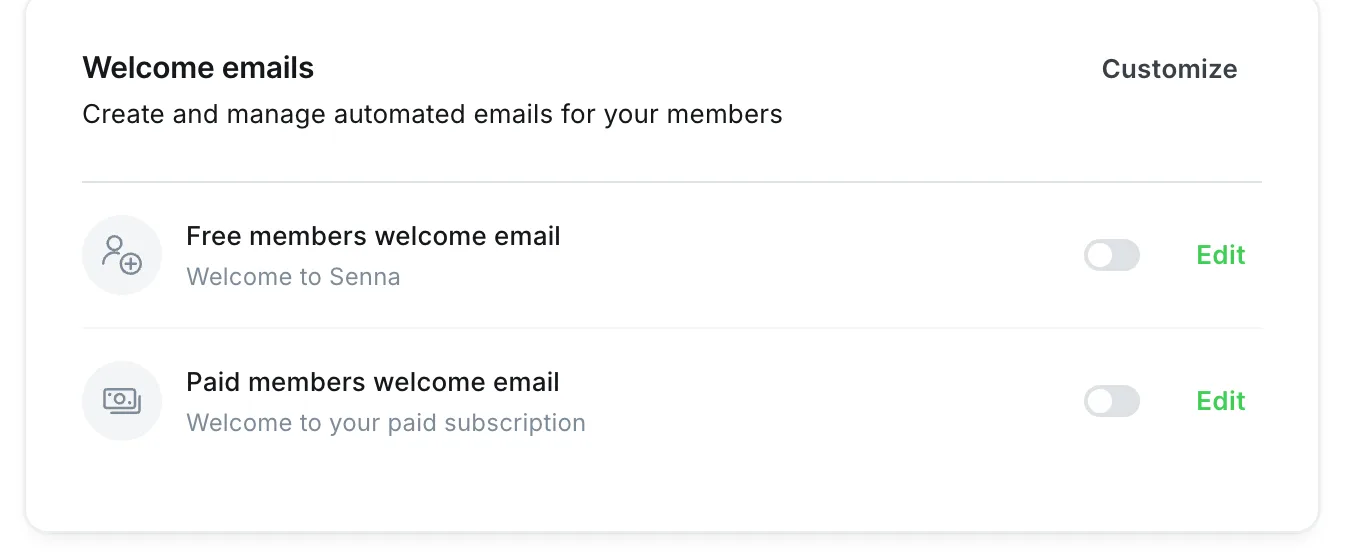
Two things follow from this that are worth saying plainly. If Mailgun is not set up, the newsletter and the test send will both fail, and Ghost will not quietly fall back to your SMTP account. And the welcome emails that Ghost added in early 2026 go through the one-to-one path, so a working SMTP account is enough for them. The exception is email sequences, the timed series of messages you can send to new members, which go through Mailgun. If you have turned on the Automations beta under Settings → Labs, welcome emails move into that flow and go through Mailgun too.
Why Ghost only supports Mailgun
Ghost’s documentation is direct about it. The FAQ says that “a bulk-mail provider is required to use this feature and SMTP cannot be used.” The reason it gives is that sending bulk email through an ordinary mail account “will result in your IP address being instantly blacklisted and marked as spam by all mail providers.” The same page confirms that one-to-one email “can be configured to send with any SMTP, or another mail service that you prefer.”
Why Mailgun alone, and not also Postmark, Amazon SES or SendGrid? The docs answer that too: “We’re a small team with limited resources, and supporting multiple bulk-mail APIs is too much overhead for us to manage.” It is a deliberate choice, not a technical limit. People have asked Ghost to reconsider. In March 2026, a community member offered code that would have added support for other providers. Ghost’s founder closed it, writing that the team has “no intention of merging this work, because the core team is not able to support its maintenance.” He added that rebuilding email to support several providers “is not something we currently have the capacity to review or maintain.” The exchange is public. As of August 2026, Ghost has exactly one way to send newsletters, and it speaks Mailgun’s API.
That last detail matters for everything below. Ghost does not need Mailgun itself. It needs something that answers like Mailgun at the address it is given. Every workaround in this guide relies on that.
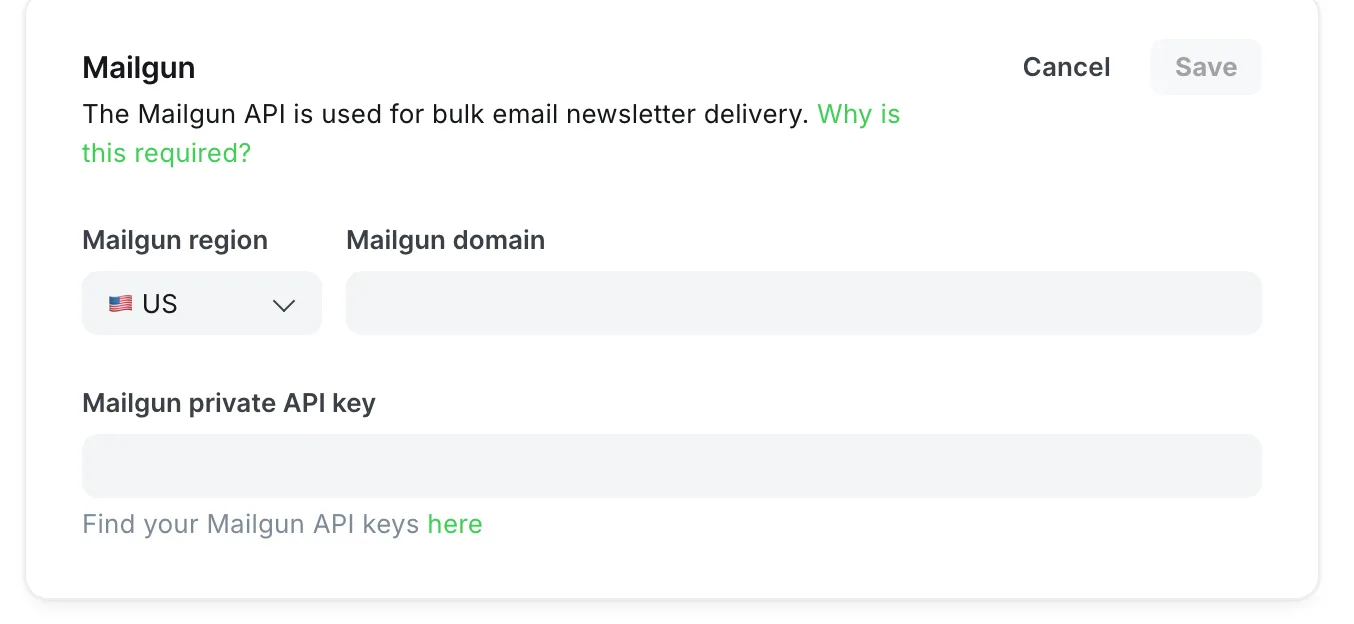
This panel is the entire newsletter-sending setup in Ghost: a region, a sending domain, and your Mailgun account’s private API key. Ghost asks for the account-level key rather than a sending-only key because it also reads delivery reports back from Mailgun to power its analytics. The region has to match where your Mailgun domain lives, US or EU. A mismatch is one of the most common reasons a send is rejected.
Setting up the one-to-one email
Whatever you decide about newsletters, a self-hosted Ghost site still needs a working email account for the small messages. Since 2025 this is less optional than it used to be: when a staff member signs in from a new device, Ghost emails them a verification code first. We learned this on our own demo sites. A placeholder email setting meant every sign-in attempt ended with “Failed to send email. Please check your site configuration and try again,” and password-reset emails never arrived either. Real credentials fix it. If you are locked out in the meantime, the setting that controls the device check can be turned off temporarily (see the troubleshooting section below).
Here is a working email block for any provider. It goes in config.production.json:
"mail": { "from": "'Your Publication' <hello@yourdomain.com>", "transport": "SMTP", "options": { "host": "smtp.yourprovider.com", "port": 587, "secure": false, "auth": { "user": "SMTP_USERNAME", "pass": "SMTP_PASSWORD" } }}A few notes on the values:
- Port 587 with
secureset tofalseuses STARTTLS; port 465 needssecureset totrue. Mixing them up produces a confusing TLS error (“wrong version number”). - The password field is called
pass, notpassword. Ghost accepts the transport name in any capitalization, so that is never the cause of a failure. - The
fromaddress should be a real mailbox on a domain you have authenticated with your provider (SPF and DKIM). Ghost’s docs note that this “greatly improves delivery rates” for resets and invitations. - For the technical reader: in Docker, each nested key becomes an environment variable with double underscores, for example
mail__options__hostandmail__options__auth__pass.
Which provider? Any transactional email service works. Postmark charges $15 a month for 10,000 emails on its Basic plan and has a free tier of 100 a month. Amazon SES charges $0.10 per 1,000. Brevo works, and so do Mailgun’s own SMTP credentials if you end up with a Mailgun account anyway. A small site sends very few of these emails, so the free tiers are enough. What matters is sending from your own authenticated domain, not which company you pick.
Your options for the newsletter
Here are the real choices, in the order we would consider them.
1. Use Mailgun, at the right size
The plain answer is usually the right one. Mailgun’s plans, as listed in August 2026:
| Plan | Price | Included | Notes |
|---|---|---|---|
| Free | $0 | 100 emails/day | 1 custom sending domain; testing and tiny lists only |
| Basic | from $15/mo | 10,000/mo | No daily cap; 1 custom domain |
| Foundation | $35/mo | 50,000/mo | First month free; 1,000 sending domains |
| Scale | $90/mo | 100,000/mo | Dedicated IP, 30-day logs |
Extra emails cost $1.10 to $1.80 per 1,000. The old pay-as-you-go plan, called Flex, is no longer offered to new accounts. Accounts still on it saw the rate double from $1 to $2 per 1,000 messages on December 1, 2025, which is what sent many people looking for alternatives.
Before you rule this out, do the arithmetic for your list. A weekly newsletter to 1,000 subscribers is about 4,300 emails a month, well inside the Basic plan at $15. A weekly newsletter to 2,500 subscribers is about 10,800, so Basic with a little overage, or Foundation at $35. Set up a subdomain for sending, such as mg.yourdomain.com, add the DNS records Mailgun gives you, wait for the domain to verify, and paste the region, domain and private key into Ghost. Do not try to run a real list on Mailgun’s sandbox domain: it only delivers to up to five addresses you have approved by hand.
Choose this if you want everything Ghost’s newsletters can do, including analytics, bounce handling and sequences, with nothing extra to run, and $15 to $35 a month fits your budget.
2. Let your host handle email
On Ghost(Pro), newsletter delivery is included on every plan and the Mailgun question never comes up. Some independent managed hosts include email too: Magic Pages and Midnight each include about 10,000 emails a month in their base plans, and Midnight offers unlimited sending if you connect your own Mailgun account. Container and platform hosts such as PikaPods and Railway leave email to you. Our Ghost hosting comparison has the full table with checked prices.
Choose this if you self-host to save money rather than to stay in control. Once you add Mailgun’s Basic plan to a $6 to $12 server, the gap to a managed plan is small, and the managed plan includes the upkeep.
3. Send through Amazon SES, with a small translator in between
This is the option for people who want the lowest possible cost per email. Amazon SES charges $0.10 per 1,000 emails, so a send to 5,000 people costs about fifty cents. Ghost cannot talk to SES directly. But because Ghost will talk to anything that answers like Mailgun, a small service can sit between the two: it accepts Ghost’s Mailgun-style requests and passes the emails to SES.
The most complete one we have found is mailgun-ses-proxy, an open-source project (AGPL-3.0) maintained by a managed Ghost host that uses it in production. A modified version appeared in April 2026. It runs in Docker next to Ghost. It needs an AWS account with SES and SQS access, a verified sending domain, and a MySQL database. It also sends delivery, open, click, bounce and complaint reports back to Ghost, so the analytics keep working. You point Ghost at it through the config file rather than the admin panel:
bulkEmail__mailgun__baseUrl=http://your-proxy:3000/v3bulkEmail__mailgun__apiKey=a-secret-you-choosebulkEmail__mailgun__domain=your-verified-ses-domain.commail__from=newsletter@your-verified-ses-domain.comFor the technical reader: when a bulkEmail.mailgun block exists in the config file, Ghost uses it and ignores the Mailgun panel in the admin.
Be clear-eyed about what you are taking on:
- You are now running part of an email system. The list of addresses that bounced or complained lives in the proxy’s database, and Ghost only marks a member when the proxy reports a failure. You will watch its logs and update it when Ghost changes.
- New SES accounts start in a sandbox. Until you request and receive production access, you can only send to addresses you have verified, and no more than 200 messages a day. Amazon usually answers within a day. Verifying your domain first speeds this up.
- It is a small project with a strong license. A couple of dozen people have starred it on GitHub, not thousands, and the AGPL license matters if you ever offer this to others as a service.
- Reputation is yours to build. SES is inexpensive partly because it assumes you handle warm-up, list hygiene and complaint rates yourself.
Choose this if you are comfortable running one more container, your list is large enough that Mailgun’s plans hurt, and you want the lowest cost per email.
4. Any SMTP account behind a Mailgun look-alike, for very small lists only
A related project, libre-mail-api, takes the same idea one step further. It imitates Mailgun’s API and forwards each email to any ordinary SMTP account. It works for basic sending, and that is roughly where it stops: no open or click tracking, no bounce handling, no statistics. More importantly, people testing it on larger lists have reported duplicate deliveries, in one case at least seven copies per recipient, along with timeouts. The cause is structural. Ghost gives each batch about 60 seconds, an ordinary SMTP server answers slowly, Ghost retries, and your readers receive the duplicates.
This is, in the end, the reason Ghost refused to support SMTP for newsletters: sending bulk email through one ordinary mail server does not scale. Putting a tool like this in front of a proper bulk service such as SES brings you back to option 3 with extra steps.
Choose this if your list is a few hundred people, you can live without analytics, and you are experimenting. Do not run a paid publication on it.
5. Keep Ghost for the website and send from another tool
Ghost can pass your members to another service, through Zapier, its Admin API or webhooks, and that service sends the newsletter. People do this with listmonk, Mailchimp, Kit, Buttondown, or their own scripts that fetch a post from Ghost and send it through Postmark or SES. The few Ghost-to-listmonk bridges on GitHub are small and mostly dormant. In every version of this you give up what makes Ghost’s newsletters worth having. You lose sending to paid members only, choosing the audience per post, one record per member, Ghost’s email analytics, and the single “publish and email” button.
Choose this if you already run a newsletter tool you like and Ghost is mainly your website.
6. Turn newsletters off
Under Settings → Newsletters, newsletter sending has a single switch. With it off, Ghost is a very good blog and membership platform that never asks about Mailgun. Members can still sign up and read members-only posts, and your SMTP account handles the small emails. Plenty of sites run this way and add newsletters later.
Which one to pick
| Situation | Do this |
|---|---|
| Up to ~2,300 subscribers, weekly | Mailgun Basic ($15) — done |
| 2,300–10,000, weekly | Mailgun Foundation ($35), or Ghost(Pro)/managed host if you’d rather not self-host at all |
| 10,000+ and technical | SES via mailgun-ses-proxy; budget the time to run it |
| Want email without any setup | Ghost(Pro) or a managed host with included sends |
| Testing / friends-and-family list | Mailgun Free (100/day) with a verified custom domain |
| Already love another newsletter tool | Sync members out; use Ghost for the site |
| No newsletter yet | Turn sending off; configure SMTP only |
When something goes wrong
These are the failures we see most often, with the usual cause.
“Mailgun is not set up”, or the newsletter fails while sign-in links work. Two kinds of email, one configured. Newsletters need the Mailgun panel (or the bulkEmail.mailgun block); your SMTP settings do not affect them.
Mailgun error 401: Forbidden. Check these in order. The sending domain is missing its subdomain prefix, such as mg.. The region is wrong, for example an EU domain with the US option selected. You pasted a sending-only key where Ghost wants the account’s private key. Or the domain is not verified yet.
The test email arrives but the real send is rejected, or you see “too many recipients”. You are sending from Mailgun’s sandbox domain, which only delivers to up to five approved addresses. Add and verify a real sending domain.
A TLS error mentioning “wrong version number” on one-to-one email. The port and the secure setting disagree. Use 465 with secure: true, or 587 with secure: false.
“535 Authentication failed” on SMTP. Wrong credentials are the obvious cause. Two less obvious ones: a Gmail account that needs an app password, and a sending host on a doubly nested subdomain that your TLS certificate does not cover. In that last case, recreating the Mailgun domain one level up fixed it.
“Failed to send email. Please check your site configuration and try again” when signing in. Ghost’s device verification for staff logins needs working one-to-one email. Fix the mail block. If you are locked out, set the environment variable security__staffDeviceVerification=false until email works, then turn it back on.
A TypeError mentioning “Cannot create property ‘mailer’ on string ‘smtp’”. This is almost always a broken installation rather than a typo: the wrong version of the email library ended up in the install. Remove node_modules and reinstall the dependencies for your Ghost version.
The newsletter fails only above a certain list size. Ghost sends in batches of up to 1,000 recipients per request (adjustable with bulkEmail.batchSize). If a proxy in front of Mailgun cannot answer a batch of that size within Ghost’s timeout, lower the batch size, or stop using the proxy.
What to do now
If you came here hoping for a one-line setting that makes newsletters work over any email account, it does not exist, and Ghost has said it is not planning one. What does exist is a clean split: your own email account for the small messages, and a bulk service for the newsletter. That bulk service can be Mailgun, a host that runs Mailgun for you, or a small translator in front of Amazon SES.
For the rest of the setup, including design, segments, analytics and paid tiers, continue with the Ghost newsletter guide. For the server side, the self-hosting guide covers Docker, sizing and backups. And once delivery works, the part your readers actually see is the website they subscribe on. Our themes built for newsletters include signup, archive and membership pages designed around that flow; Luno, for example, has a homepage layout built around a newsletter signup.
Frequently Asked Questions
Can I send Ghost newsletters with SMTP instead of Mailgun?
Does Ghost(Pro) require a Mailgun account?
What is the cheapest way to send newsletters from self-hosted Ghost?
Can I use Amazon SES with Ghost newsletters?
Keep reading
Ghost as a Publishing Platform: Full Overview
Ghost combines a CMS, newsletter system, and membership platform into one. Here is what makes it different from WordPress, Substack, and website builders.
How to Install Ghost: The Complete Guide for 2026
Step-by-step guide to install Ghost CMS. Covers Ghost(Pro) managed hosting, self-hosting on Ubuntu/DigitalOcean, Docker, and local development setup.
Ghost Mailchimp Integration: 4 Ways to Connect Them
Connect Mailchimp to Ghost with an embedded signup form, Zapier sync, or CSV import — or skip Mailchimp entirely using Ghost built-in newsletters.
Ghost Membership: Paid Tiers + Stripe Setup
Turn Ghost into a paid membership site: free and paid tiers, Stripe checkout, member management, and growth tactics — with Ghost taking 0% of revenue.
Recommended Themes
These themes excel at the features discussed in this article.








Comparing options? Browse all premium Ghost themes side by side.
Get every theme in one bundle
The complete Luxe Themes bundle — every theme, one purchase.