 Luxe Themes
Ghost Self-Hosting Guide: Server, Install, Upkeep
What self-hosting Ghost involves: the server it needs, Ghost's Docker Compose setup versus Ghost-CLI, email, backups, safe updates and moving to a new server.
Quick answer: Self-hosting Ghost means renting a small Linux server and installing Ghost with either Ghost’s Docker Compose setup or the older Ghost-CLI. Then you own the upkeep: email, backups, updates and security. Plan for 2 GB of memory. Use the Docker Compose setup for anything new. If you would rather write than run a server, Ghost(Pro) is the honest alternative.
Ghost is open source, so you can run it yourself instead of paying Ghost(Pro) to run it for you. People do this to save money, to keep full control of their data and server, or because they want pieces that only a self-hosted setup allows. In return they become the person who fixes it when it breaks.
This guide is about doing that well. It covers whether self-hosting suits you, what the server needs, and the two ways to install Ghost. Then it covers the parts that decide whether a self-hosted site survives its second year: email, backups, updates and moving servers. Where to rent the server, and what each option costs, is a separate question that our Ghost hosting guide answers with numbers measured on our own machines.
Our short recommendation: a 2 GB server, Ghost’s Docker Compose setup, a real SMTP service configured before the first login, and a snapshot before every update. We run our own demo sites this way.
Should you self-host at all
Self-hosting saves money and gives you control. It also makes you responsible for things Ghost(Pro) does invisibly: keeping Ghost updated, keeping the server patched, backing up the database, and getting email delivered. None of these is hard on its own. Together they are a recurring chore, and the sites that fail are the ones where the chore was skipped for two years.
Self-hosting suits you if you are comfortable in a Linux terminal and want the lowest running cost for a small site. It also suits you if you need server-level control, custom integrations, or Ghost’s analytics and ActivityPub on your own hardware.
Ghost(Pro) suits you if you would rather never see a terminal, want email deliverability handled for you, or value your time above the monthly difference. A reasonable path for a new publication is to start on Ghost(Pro), learn what you actually need, and move to a server later if the savings justify the work. For the real monthly totals, including the email service that most people forget to budget for, see Ghost hosting options compared.
What Ghost needs from a server
Ghost runs on Linux, stores everything in a MySQL database, and serves pages through a web server in front of it. Ghost’s own documentation lists these requirements:
| Requirement | What Ghost asks for |
|---|---|
| Operating system | A Linux server. Ghost-CLI supports Ubuntu 22.04, 24.04 and 26.04. Docker Compose runs on any Linux with Docker. |
| Memory | At least 1 GB. We treat 2 GB as the real minimum, for the reasons below. |
| Database | MySQL 8.0 or 8.4. |
| Runtime | A current Node 22 release for Ghost-CLI installs; recent Ghost needs 22.23.1 or later. The Docker image brings its own. |
| Processor | AMD64 or ARM64. Ghost’s images, including the optional analytics and ActivityPub containers, are published for both. We checked the registries in September 2026. |
| Network | A domain with an A record pointing at the server, and port 80 reachable so certificates can be issued. |
The domain and certificate side is covered step by step in our custom domain guide.
Why 1 GB servers struggle
A 1 GB server runs Ghost, technically. In practice it runs Ghost until the first moment anything asks for more memory, and then it crashes or starts returning 502 errors. The cause is rarely Ghost itself. It is MySQL, which with default settings takes several hundred megabytes before Ghost’s own process starts. Add Ghost and the operating system, and nothing is left for a traffic spike, an image upload, or an update.
On our own servers, an idle Ghost site uses between roughly 250 and 700 MB, and the MySQL server our sites share uses around 1.3 GB on its own. We measured this again in September 2026, and the numbers have not moved since we first looked.
Three failures follow from a starved server. The operating system kills MySQL or Ghost to free memory, and the site is down until someone reboots. Ghost-CLI refuses to update because it checks for free memory first. And MySQL dies quietly after a few days of uptime, which shows up as database connection errors rather than anything that names the real cause.
If you are on 1 GB, add swap now. Swap is disk space the system uses as overflow when memory runs out. It turns a crash into a slowdown, which is the difference between a dead site and a slow one. Cloud images usually ship without it.
sudo fallocate -l 2G /swapfilesudo chmod 600 /swapfilesudo mkswap /swapfilesudo swapon /swapfileecho '/swapfile none swap sw 0 0' | sudo tee -a /etc/fstabFor the technical reader: turning off MySQL’s performance schema, with performance_schema = 0 under [mysqld], frees a meaningful share of memory on a small server. Even so, the 2 GB tier costs a few dollars more and removes an entire category of late-night problems. That is the trade we would make.
Two ways to install, and where Ghost is going
For most of Ghost’s life, the way to self-host was Ghost-CLI, a command-line installer. It sets up MySQL, the nginx web server, a certificate and a system service on an Ubuntu machine. It still works, and most self-hosted sites were built with it.
Ghost’s own Docker Compose setup is newer. It describes the whole stack in one configuration: Ghost, MySQL, and Caddy as the web server, with Ghost’s analytics and ActivityPub as optional extras. Ghost’s documentation still labels it a preview, but it already does things Ghost-CLI cannot. A Ghost-CLI install cannot run Ghost’s web analytics, and it can only join the social web through Ghost’s hosted ActivityPub service rather than a server of your own. Ghost has also announced that when Ghost 7 ships, Docker Compose becomes the official way to self-host, and Ghost-CLI will only receive security fixes after that.
So the choice is simpler than it looks. A new site should use Docker Compose. An existing Ghost-CLI site that works can stay where it is for now, with a move planned before Ghost 7 arrives. There is no date for that yet, and Ghost 6 remains fully supported with Ghost-CLI until then.
The exact commands for both methods are in our step-by-step Ghost installation guide. The two sections below explain what each one sets up and what to know about it afterwards.
Docker Compose: the setup Ghost maintains
The setup lives in a Git repository, and installing it is mostly copying two example files and editing one of them. You need a server with Docker installed, a domain already pointing at it, and the details of an SMTP service for Ghost’s one-to-one emails. In the settings file, .env, you set three things: your domain, two database passwords, and the SMTP details. Everything else has a working default. Two commands then download and start the containers.
Once the setup is running, Caddy requests a certificate for your domain by itself, and Ghost is ready at your domain with the admin at /ghost. There is no nginx to configure and no certificate to renew.
A few things are worth knowing about what this setup installs.
- Your data lives in two folders on the server,
data/ghostfor uploads and themes anddata/mysqlfor the database, next to the configuration. Those two folders and the.envfile are what you back up. - Analytics and ActivityPub are switched on with one variable, plus the setup each needs. Setting
COMPOSE_PROFILESin.envto includeanalyticsoractivitypubadds those containers on the next start. Analytics also needs a Tinybird account and a short login and deploy sequence that the docs walk through. ActivityPub needs its target line uncommented and the Ghost and Caddy containers recreated. The Ghost ActivityPub guide covers the limits of the hosted service and why the Network tab can fail. - The Ghost version is pinned by a variable. By default the setup follows the latest Ghost 6 image. The
GHOST_VERSIONvariable in.envlets you hold a specific release if you need to, at the cost of the update command no longer moving you forward until you change it back. - The www redirect is a commented block in the Caddyfile. Uncomment the one you want. The custom domain guide explains why Ghost itself does not do this.
For the technical reader: the compose file names the services ghost, db and caddy, which matters for the backup commands below, and the database is the official MySQL 8 image.
Ghost-CLI on Ubuntu
The older route is an Ubuntu server, a current Node 22 release, and Ghost’s installer.
The installer asks for your site address and database details, then sets up nginx, a Let’s Encrypt certificate and a system service so Ghost restarts with the server. The installation guide linked above walks through the full sequence, including the user, MySQL and Node preparation that has to happen first.
Two things distinguish it from the Docker setup. You cannot run Ghost’s analytics or your own ActivityPub server alongside it, and it is the path Ghost is winding down. If you already run it, keep it updated and plan the move. If you are starting today, there is no reason to choose it.
Email: the part that surprises everyone
Every self-hosted Ghost sends two different kinds of email, and they are configured in two different places. Understanding this before the first login saves a lot of confusion.
The first kind is one-to-one mail: the sign-in link for staff, the magic link a reader clicks to subscribe, receipts and password resets. Ghost sends these through any ordinary SMTP service. On the Docker Compose setup, the SMTP details go in .env. On a Ghost-CLI install, they go in the config file.
The second kind is the newsletter itself, sent to everyone at once. For that, Ghost only talks to Mailgun’s bulk sending API, or to a service that imitates it. Not SMTP, not any other provider directly. Ghost’s reasoning is that bulk mail over plain SMTP is the fastest way to get a server blacklisted. The practical consequence trips up almost every new self-hoster. Test emails from a draft arrive, because they use the SMTP path, while the published newsletter never goes out, because Mailgun is not configured. Our guide to Ghost newsletters without Mailgun covers the Mailgun setup, the alternatives that work, and the ones that don’t.
One lockout is worth a paragraph of its own, because we did it to ourselves. Ghost 6 emails staff a verification code on sign-in from a new device. If the SMTP settings are a placeholder, that email fails, and the message you see is “Failed to send email. Please check your site configuration and try again.” No staff member can log in, and password resets fail the same way. Configure real SMTP before you create staff accounts. For the technical reader: the check can be turned off with the security.staffDeviceVerification setting, security__staffDeviceVerification=false as an environment variable, until mail is working.
Backups you can actually restore
If the server dies and you have no backup, the publication is gone. Three things need copying, and each has a cheap way to do it.
The database. A nightly dump from cron is the minimum. On the Docker Compose setup the database service is named db, and the root password is already set inside that container, so the job reads it from there rather than from your shell.
# crontab -e0 3 * * * cd /opt/ghost && docker compose exec -T db sh -c 'mysqldump -u root -p"$MYSQL_ROOT_PASSWORD" ghost' > /backups/ghost-$(date +\%Y\%m\%d).sqlThe content folder. Uploads, themes and files: data/ghost on Docker Compose, the content directory of a Ghost-CLI install. Copy it off the server on a schedule, not only to another folder on the same disk.
The configuration. The .env and Caddyfile, or the Ghost-CLI config file. Without them a restore takes hours of guesswork.
On top of that, take a server snapshot at your provider once a week and before every update. A snapshot copies the entire machine, database mid-write included, for cents. Ghost-CLI also ships a ghost backup command that zips your content, a member export, your themes and media, and the routes and redirects files into one archive. It does not include the config file, so copy that separately. It is cheap insurance to run before anything risky.
Then test a restore, once, on a throwaway server. A backup that has never been restored is a hope, not a backup.
Updating without losing the site
Updates are where self-hosters lose sites. The pattern is always the same: no snapshot, the update half-completes, and the rollback fails too. A safe routine has four steps.
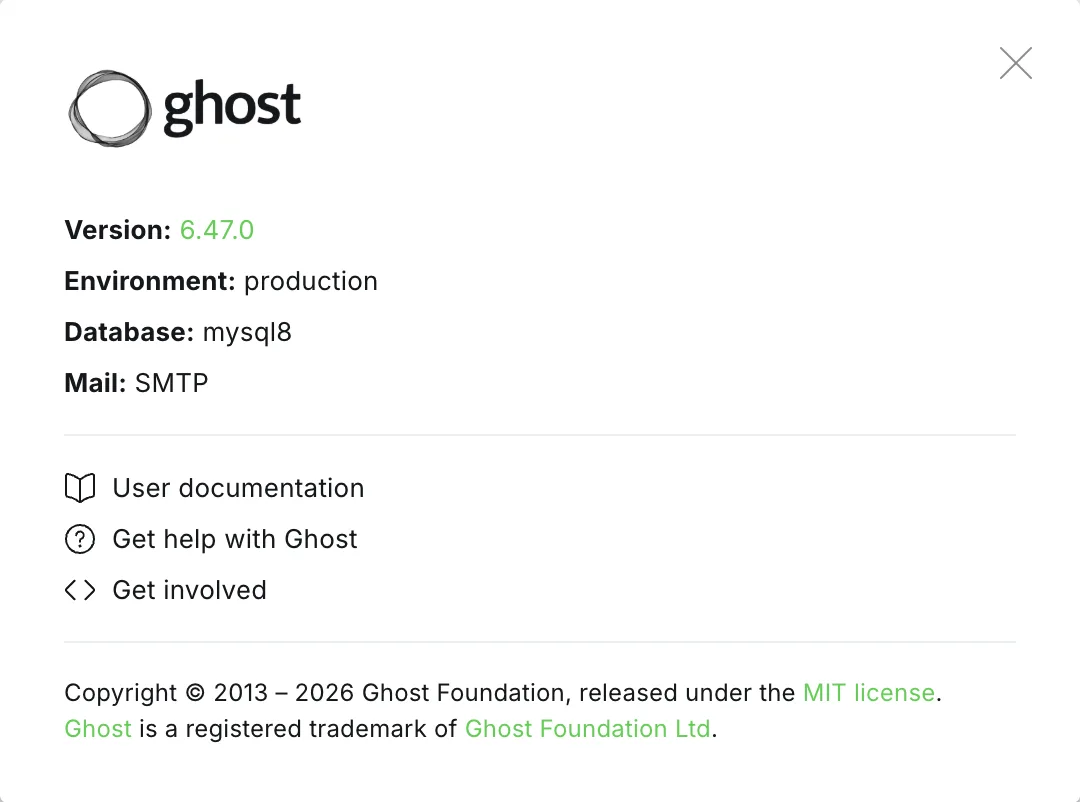
Know what you are running. Ghost admin shows the version under Settings, then About at the bottom of the settings list. Compare it with Ghost’s release notes before a major version jump, because majors occasionally need manual steps.
Snapshot first. Updates run database migrations, which change the structure of the database as they go. A content export cannot recover a database caught halfway through one. A snapshot can.
Then update. On the Docker Compose setup it is one line from the setup directory.
git pull && docker compose pull && docker compose up -dOn a Ghost-CLI install, update the CLI itself first, because an old CLI refuses to install a new Ghost. Make sure the server runs a current Node 22 release too, because each Ghost release sets its own minimum:
sudo npm install -g ghost-cli@latestghost updateIf it goes wrong, roll back. The Docker setup goes back to the snapshot. Ghost-CLI has a rollback flag, ghost update --rollback, which reverts to the previous version. Treat it as a convenience rather than a substitute for the snapshot, because the database may already have changed.
Two Ghost-CLI habits prevent most failed updates. Run ghost doctor before updating; it reports missing packages, permissions and memory problems. And never leave an install years behind. Old Ghost versions have known, exploited vulnerabilities. An install that skipped two major versions has to be walked forward one major at a time, with a snapshot before each step.
Moving to a new server
Sooner or later you outgrow the server, change providers, or move from Ghost-CLI to Docker. The reliable way is to move the data, not to re-import an export, because Ghost’s content export does not include members.
- Install fresh Ghost on the new server, on the same major version, and confirm it starts.
- On the old server, take a final database dump and copy the content folder.
- On the new server, restore the dump into the database and put the content folder in place, then restart Ghost.
- Point the domain’s DNS at the new server.
- Get a new certificate on the new server after DNS has moved. Do not copy the old certificate. Caddy does this on its own; on Ghost-CLI, run the SSL setup again.
- Keep the old server for a few days, then delete it.
Paid members keep working because their subscriptions live in Stripe, not on the server, as long as the new site connects to the same Stripe account.
Keep an eye on it
Set up uptime monitoring so you hear about downtime before your readers do. Free tiers of the common monitoring services check a site every few minutes and email or message you when it stops answering. That, plus the nightly backup, is the whole minimum for a site you can leave alone for a month.
Common questions
Can I run Ghost on a Raspberry Pi?
Yes, for a small site. Ghost, MySQL and the optional analytics and ActivityPub containers are all published for ARM, so the Docker Compose setup runs as it would on any other server. Give it the most memory you can; MySQL is the constraint, not Ghost.
How much memory do I need?
One gigabyte works for a small site with swap configured, with the caveats above. Two gigabytes is where Ghost and MySQL stop fighting and updates stop failing. 4 GB is comfortable for busy sites, ActivityPub, or several staff members working at once.
How do I move from Ghost(Pro) to self-hosted?
Export your content under Settings → Advanced → Migration tools and your members as CSV from the Members page. Download your theme from the Installed list under Settings → Site → Theme → Change theme. Set up the self-hosted site, import the content, upload the theme, import the members, then point DNS at the new server and configure email. Paid subscribers stay attached to your Stripe account, so reconnect the same account on the new site.
Where this leaves you
You know what the server needs, which install path to take, and the four chores that keep a self-hosted site alive. For where to rent the server, see Ghost hosting options compared; the custom domain guide helps with pointing a domain at it, and the newsletter guide with the email side. Once Ghost is running, a theme is a zip file uploaded under Settings → Site → Theme, and it works the same whether Ghost is self-hosted or on Ghost(Pro). Our Ghost themes are developed and demoed on self-hosted sites like the ones described here.
Frequently Asked Questions
What server do I need to self-host Ghost?
Should I use Docker Compose or Ghost-CLI to install Ghost?
Why won't my self-hosted Ghost send newsletters?
How do I update self-hosted Ghost safely?
Keep reading
How to Install Ghost: Each Method Step by Step
Install Ghost on Ghost(Pro), with Ghost's Docker Compose setup, with Ghost-CLI on Ubuntu, or on your own computer: what each needs and the steps to follow.
Ghost Behind a Reverse Proxy: Loops, Images, Logins
Ghost expects a proxy in front of it. Two settings decide whether it works: the site URL and the forwarded-protocol header. What breaks when either is wrong.
Ghost Custom Domain Setup: DNS, SSL and Email
How to point a domain at Ghost(Pro) or a self-hosted site: the DNS records, automatic SSL, the www redirect Ghost does not do for you, and a sending domain.
Ghost Newsletters Without Mailgun: Real Options
Self-hosted Ghost only sends newsletters through Mailgun. What SMTP can and can't do, how Amazon SES and Postmark fit, what the proxies cost, and what to pick.
Recommended Themes
Themes with at least one of the features this guide touches: SEO optimization and membership pages.

Tribune
Strongest hereTribune is the front page of a newspaper. Lead stories beside the day's picture, a Featured list at the edge, then your sections by topic, each in its own layout, under a masthead that folds away as the reader scrolls. Built for newspapers and multi-author magazines that publish several stories a day, and managed entirely from Ghost admin.

Luno
Strongest hereLuno is a blog that works like an app. A menu that stays open in a fixed sidebar, search a keystroke away, a light and dark switch beside your logo, and a homepage that opens with three featured stories as cover cards. Built for travel, lifestyle and product blogs whose readers expect an interface they already know, and managed entirely from Ghost admin.


Comparing options? Browse all premium Ghost themes side by side.
Get every theme in one bundle
The complete Luxe Themes bundle: every theme, one purchase.