 Luxe Themes
Why Ghost Asks Subscribers to Confirm by Email
Ghost makes every new subscriber click a link before they exist on your list, and never shows the ones who did not. Why that is, and how to lose fewer of them.
Quick answer: In Ghost, typing an email address into a free signup form is a request, not a subscription. The person becomes a member only when they click the link Ghost emails them, and Ghost never shows you the addresses that did not click. The click is the consent that email law in many countries requires. You cannot switch it off, but you can make the email arrive, tell people to expect it, and use Ghost’s routes for people who already agreed.
Ghost’s member list only ever contains people who clicked a link in an email. So the reader who signed up last week and is not on the list is not a bug, and neither is the event signup sheet you typed in that produced no members. It is a decision, and understanding it makes the rest of your setup better.
This guide explains what happens between the signup form and the member list. It covers why Ghost draws the line where it does, and what you can do about the people who fall in between. We read Ghost’s help pages and the part of its source that handles the link, and the numbers below come from there.
What happens when someone signs up
A free signup on a Ghost site is three steps, and the person is a member only after the third.
- They enter an address. The form, whether Ghost’s own signup window or a form in the theme, asks Ghost to send that address a link. No member record is created yet.
- Ghost sends one email. Its subject line contains “Complete your sign up to” and your site’s name, and the email holds one link. A theme’s quick subscribe form uses “Confirm your subscription to” instead. The link is valid for twenty-four hours. Once someone opens it, it keeps working for ten more minutes and a handful of further clicks, which matters below.
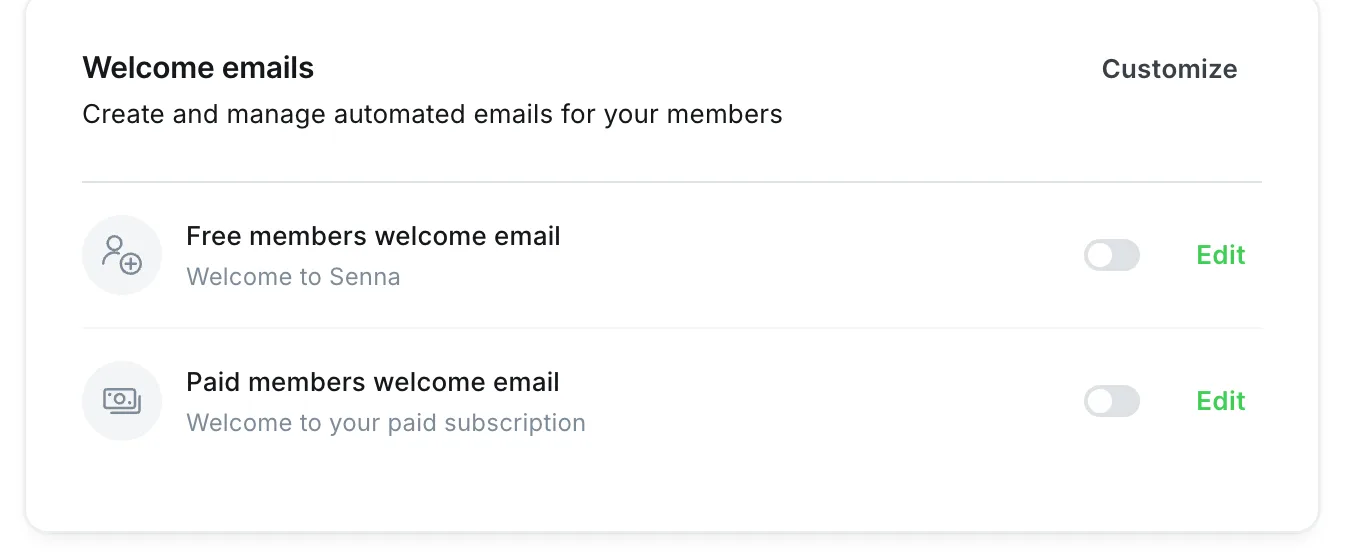
- They click, and they are a member. Clicking the link opens the site with the person signed in, and only now do they appear in your member list. If you have a welcome email switched on under Settings → Membership → Welcome emails, it goes out at this point, one version for free members and one for paid.
A paid signup is different. Ghost creates the member the moment the payment goes through in the checkout, with no confirmation click, and then emails a sign-in link. The rest of this guide is about free signups, which is where the confirmation step lives.
The same mechanism signs existing members in. Entering the address again sends a fresh link. The sign-in email also carries a short code to type instead, for people who cannot click because the email opened on a different device.
Why the middle step is not optional
Ghost’s own explanation is short. Members who never click the link are never sent to your dashboard. It is not possible to see their addresses, and it is not possible to email them. The reason given is that the click is the member “confirming that they give you permission to email them in the future”. Many countries require that permission before promotional email may be sent.
This is the practice usually called double opt-in, and Ghost applies it to every site rather than making it a setting. Two things follow from that.
The first is that the confirmation step is doing a job for you, not only for the law. Anyone can type any address into a form. Without the click, a bot, a rival or a typo can put strangers on your list. The next newsletter you send then goes to people who never asked for it. That is how mail providers come to treat everything you send as spam, and it is slow to repair. The step has a cost of its own: a bot can submit thousands of addresses and turn the confirmation emails themselves into the nuisance. Our spam signups guide covers that case.
The second is that some signups will not complete, and you will not be told which. Someone enters an address on their phone at a bus stop, the email lands in a folder they do not check, and the moment passes. On any platform some share of signups is lost this way; Ghost differs in refusing to hold on to the unconfirmed ones. That is the trade you make for a list where everyone has said yes.
Losing fewer of them
You cannot remove the step, but most of the loss is not the step itself. It is the email not arriving, or the person not knowing to look for it.
Make the email arrive. On Ghost(Pro), confirmation emails go out through Ghost’s infrastructure and usually arrive, and the common failure is a spam folder. A custom sending domain, available on the Publisher plan and above, puts your own domain in the From address, which helps. On a self-hosted site, the email is only as reliable as the sending service you connected. If none is configured, confirmation emails rarely arrive. Our guide to Ghost newsletters without Mailgun covers setting that up, including the domain records that authenticate your sender.
Tell people to expect it. Ghost’s own signup window says so after a signup, telling the person to click the link in their inbox and to check spam if nothing arrives within three minutes. A theme’s own form may not, and a person who does not know an email is coming will not look for it. A line next to the form, or in the success message, that says “check your inbox for the confirmation link” means fewer people mistake silence for a failed signup. If the email is likely to land in spam, say that too.
Make the email recognisable. Ghost sends it from your site’s name unless you configured a different sender, so sign up on your own site once and look at what arrives. If the From name does not match the site the person just visited, they delete it unopened.
At events, put the phone in their hand. A signup sheet you type in later rarely works, because the confirmation lands in an inbox whose owner is no longer expecting it. Ask people to sign up on their own phone while you are talking to them, and the confirmation arrives while they still care. If the sheet is all you have, and people signed it to receive your emails, import it as a list instead, as described below.
When you already have consent
Ghost has one remedy for members whose emails go astray, and two routes that add people without a confirmation email. Use the two routes only when the person has genuinely agreed to receive your emails.
A sign-in link you send yourself. On a member’s profile page in Ghost admin, the Impersonate option gives you a sign-in link you can copy and send to them directly. Ghost’s help page suggests it for members whose emails keep going astray. It works only for people who are already members, so it fixes the sign-in problem, not the signup one.
Importing a list. Members added by CSV import are members immediately, with no confirmation email. The same is true of members created through the Admin API, the interface other software uses to add members, unless that software asks Ghost to send an email. That is right for a list you are moving from another platform where people already subscribed, or a signup sheet people filled in to get your emails. It is wrong for a list of addresses that never agreed to anything. Our Mailchimp guide covers the import, including the consent step of keeping only the people who had subscribed.
The agreement checkbox is a different thing
Ghost’s signup window has a separate option under Settings → Membership → Signup portal. It shows a short notice at signup and can require the person to tick a box agreeing to it. That is a consent checkbox for your terms, not the email confirmation, and the two are independent. The notice is limited to a short line of text, which some publishers find too short for what their lawyers want on the form.
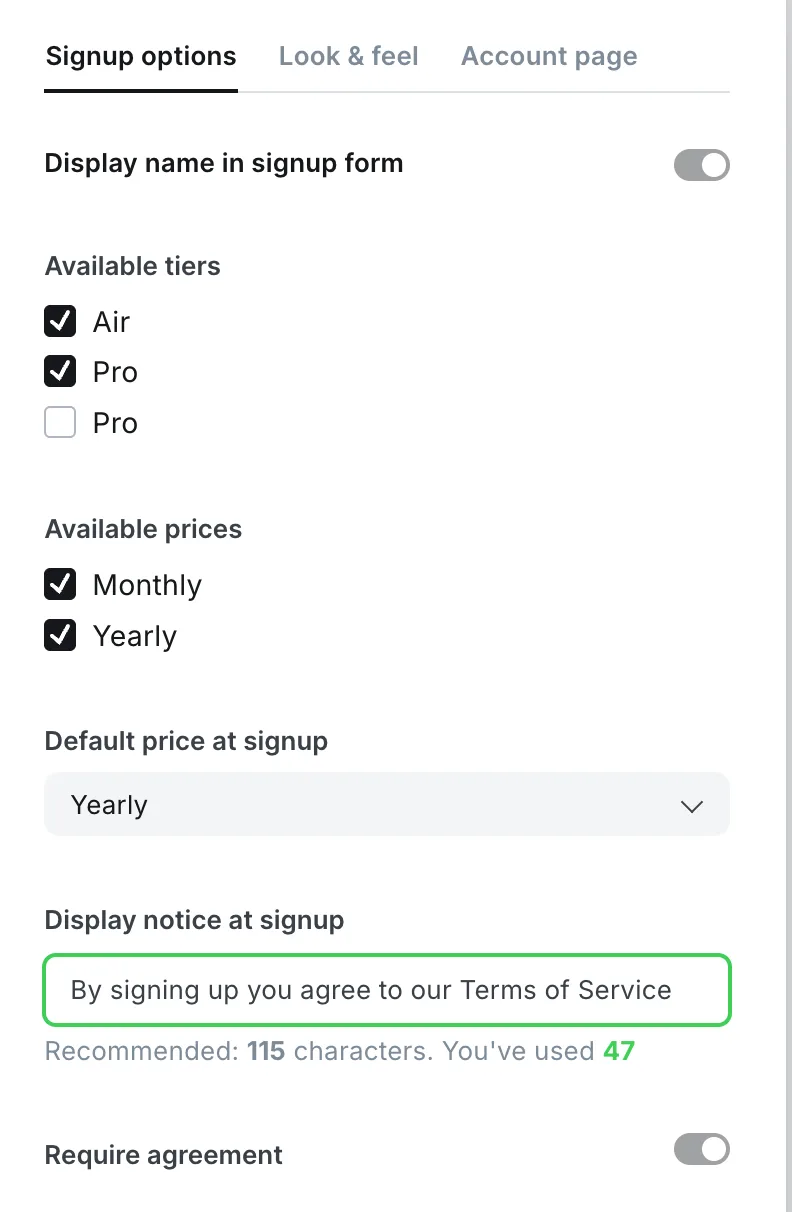
Whether you need the checkbox, and what it should say, depends on where you and your readers are, and we are not the people to advise on that. What we can say is that the confirmation click is the part Ghost handles for you everywhere, and the checkbox is the part that is yours to decide. Our Portal guide covers the setting itself.
When it looks like a problem and is not
A few things look like lost signups and are something else. A member who appears in the list without having clicked anything is usually security software at their company opening links in incoming email. The link keeps working for ten minutes after that first open, so the real person still gets in if they click soon after. Later than that, they enter their address again for a fresh sign-in link. A member who joined but says they got nothing is looking for the welcome email, which only goes out if you switched it on. And a burst of signups from addresses you do not recognise is the spam guide’s territory, not a confirmation problem.
Where this leaves you
You know that a Ghost signup is a request until the click, and that Ghost will not show you what happened before it. The losses mostly come from email that did not arrive or was not expected, so fix the sending first, then the wording at the form. If the sending side is the open question, the newsletter guide is the next thing to read. If it is the signup window, the Portal guide covers every option in it.
Frequently Asked Questions
Why do Ghost subscribers have to confirm their email?
Can I see subscribers who signed up but never confirmed?
How long is the Ghost confirmation link valid?
Why are my confirmation emails not arriving?
Keep reading
Ghost Memberships: Set Up Free and Paid Tiers
How Ghost memberships work and how to set them up: free and paid tiers, connecting Stripe, gating posts and managing members. Ghost takes no cut of revenue.
Ghost as a Publishing Platform: Full Overview
Ghost combines a CMS, newsletter system, and membership platform into one. Here is what makes it different from WordPress, Substack, and website builders.
Ghost Newsletter: Setup, Design and Delivery
How Ghost's built-in newsletter works and how to set it up: sending with Mailgun or without it, email design, segments, and paid subscriptions with no cut.
Stopping Spam Signups on a Ghost Site
What spam signups do to a Ghost site, what Ghost already blocks on its own, and what to add in front of it. We tested the built-in limit on our own site.
Recommended Themes
Themes with at least one of the features this guide touches: newsletter integration and membership pages.
Tribune
Strongest hereTribune is the front page of a newspaper. Lead stories beside the day's picture, a Featured list at the edge, then your sections by topic, each in its own layout, under a masthead that folds away as the reader scrolls. Built for newspapers and multi-author magazines that publish several stories a day, and managed entirely from Ghost admin.

Luno
Strongest hereLuno is a blog that works like an app. A menu that stays open in a fixed sidebar, search a keystroke away, a light and dark switch beside your logo, and a homepage that opens with three featured stories as cover cards. Built for travel, lifestyle and product blogs whose readers expect an interface they already know, and managed entirely from Ghost admin.


Comparing options? Browse all premium Ghost themes side by side.
Get every theme in one bundle
The complete Luxe Themes bundle: every theme, one purchase.