 Luxe Themes
Ghost vs WordPress: Which Is Better for Publishing?
WordPress needs 10 plugins to match what Ghost includes. Compare newsletters, memberships, SEO, security, and the true cost of each for bloggers.
Quick answer: For publishing and newsletters, Ghost does the job with far less overhead — native newsletters, 0%-fee memberships, and built-in SEO with no plugins, from $15/mo. WordPress wins on scale, flexibility, e-commerce, and theme choice, but a comparable publishing stack (plugins + an email service) runs $80-160+/mo. Choose Ghost to publish and monetize simply; choose WordPress when you need a do-everything CMS.
Different Tools for Different Jobs
WordPress powers 43.4% of all websites. Ghost powers a fraction of a percent. This comparison isn’t about which platform is “better” in absolute terms — WordPress wins on scale and flexibility by an enormous margin.
The question is narrower: for writers, bloggers, and newsletter publishers whose primary goal is publishing content and monetizing through subscriptions, which platform does the job with less overhead?
WordPress started as a blogging tool and evolved into a general-purpose CMS that powers everything from e-commerce stores to government websites. Ghost stayed focused on professional publishing — articles, newsletters, memberships — and built those features into the core product.
That focus is the reason this comparison exists.
Newsletter and Email
Ghost
Fully native. Write a post, choose your audience, publish — it goes to your website and your subscribers’ inboxes simultaneously. No third-party service needed.
- Multiple newsletters per publication with independent subscriptions
- Segmentation by tier, label, or newsletter subscription
- Custom sending domain on Publisher plan+ (e.g., newsletter@yourdomain.com)
- Post-send link editing for already-delivered emails
- Open rate, click rate, and per-link analytics
- Automated welcome emails for free and paid subscribers
WordPress
No native email or newsletter functionality. To send newsletters from WordPress, you need:
- MailPoet (WordPress-native plugin): Free up to 1,000 subscribers, paid plans from $10/month
- Mailchimp integration: Free up to 250 contacts, Standard plan from $20/month
- ConvertKit integration: Free up to 10,000 subscribers, Creator from $39/month
Each option requires a plugin plus an external service account. Setup time, plugin maintenance, and escalating costs as your list grows are part of the package.
Ghost includes unlimited email sends on every plan. WordPress’s email costs scale with your subscriber count.
Membership and Monetization
Ghost
Native membership system with direct Stripe integration and 0% platform fee:
- Free, paid monthly, paid annual, and multiple premium tiers
- Per-post content access rules (free, paid, specific tier)
- Member labels for custom segmentation
- One-time payments and tips (Ghost 6.0, August 2025)
- Stripe Tax for automatic VAT/GST handling
- Revenue dashboard: MRR, churn, customer lifetime value
WordPress
Plugin-dependent. The main options:
- MemberPress: Starting at $179.50/year (first year), renewal at $359/year. Content restriction, digital downloads, drip content, course builder. No free version.
- Paid Memberships Pro: Free core with 29 free add-ons. Unlimited membership levels, multiple payment gateways.
- WooCommerce Memberships: Best for existing WooCommerce stores. Requires a separate Subscriptions add-on for recurring billing.
WordPress membership plugins offer deep flexibility — course builders, drip content, digital downloads — but require setup, configuration, and ongoing maintenance. Ghost’s membership system is simpler and covers the core use case (content paywalls + subscription billing) without plugins.
SEO
Ghost
Built-in, no plugins required:
- Automatic XML sitemap (auto-linked from robots.txt)
- Schema.org structured data on every page
- Customizable meta titles and descriptions per post
- Canonical URLs (auto-set, overridable)
- Open Graph and Twitter Card tags
- AMP support
- Redirect management and noindex controls
- Google preview in the editor
WordPress
Plugin-dependent but extremely capable once configured:
- Yoast SEO (most popular): On-page optimization, readability checks, keyword management. Premium at $99/year.
- Rank Math: Often considered better than Yoast’s free version. Basic plan $49.60/year.
With Yoast or Rank Math installed, WordPress SEO is at least as capable as Ghost’s — arguably more granular. But without an SEO plugin, WordPress generates almost none of this automatically.
Both platforms are strong for SEO. Ghost has it built in; WordPress requires plugins but achieves equivalent or greater granularity with them.
Security
Ghost(Pro)
Fully managed. The Ghost team handles:
- Automatic software updates
- SSL certificate provisioning
- Server hardening
- Automated backups
- No plugin ecosystem to create attack vectors
WordPress
The core is relatively secure. The ecosystem is not:
- 7,966 new vulnerabilities in 2024 (34% increase over 2023)
- 96% of successful breaches came from plugins and themes
- ~35% of vulnerabilities disclosed in 2024 remained unpatched in 2025
- 64% of WordPress site owners reported a security incident in 2025
- AI-driven brute force attacks increased 45% in Q4 2025
Managed WordPress hosting ($20-100+/month) significantly reduces this burden but doesn’t eliminate it. Ghost(Pro) eliminates it entirely by design — there’s no plugin ecosystem to attack.
Performance
Ghost
Built on Node.js with a minimal footprint. Ghost(Pro) includes worldwide CDN, automatic SSL, and optimized caching on every plan. Fast by default without configuration.
WordPress
Performance varies enormously based on hosting, theme, and plugin stack. The data from 2025:
- Only 43-50% of WordPress sites pass Google’s Core Web Vitals
- WordPress ranked below Duda (83.63%), Shopify, and Squarespace in CWV rankings
- Shared hosting is the primary cause — lacks edge caching
- With managed hosting + CDN + caching plugins, WordPress achieves strong performance
- Plugin bloat is the most common performance bottleneck
WordPress can be fast, but it requires deliberate optimization. Ghost is fast out of the box.
Content Editor
Ghost (Koenig)
Minimalist, Markdown-native editor with dynamic cards for rich content (images, video, audio, embeds, code, bookmarks, HTML, callouts). Designed for writing, not page layout.
When I tested the Ghost editor on a 2,500-word article with embedded images and code blocks, the experience was focused and distraction-free. The editor shows you what the published post will look like without a separate preview step.
WordPress (Gutenberg)
Block-based editor where every paragraph, image, and heading is a movable block. Powerful for complex page layouts — multi-column content, custom CTAs, magazine-style designs.
Gutenberg has a steeper learning curve. The settings panel, block options, and dozens of available configurations create cognitive overhead. High-volume content teams often draft in Google Docs and paste into WordPress for this reason.
For pure writing, Ghost’s editor is faster and simpler. For complex page layouts, Gutenberg is more capable.
Design and Themes
Ghost
- Ghost Marketplace with professional themes for blogs, magazines, newsletters, and portfolios
- Third-party theme marketplaces (including our own Ghost theme collection)
- Themes use HTML, CSS, and Handlebars templating
- Custom themes available on Publisher plan+ (Starter limited to one theme)
- Smaller ecosystem but focused on publishing-specific designs
WordPress
- 10,000+ free themes in the official directory
- Thousands more on ThemeForest, StudioPress, and other marketplaces
- Page builders (Elementor, Divi, Beaver Builder) add drag-and-drop design
- Full Site Editing with Gutenberg provides template-level customization
- Themes for every conceivable use case
WordPress wins this category decisively on variety and flexibility. Ghost’s smaller ecosystem is more focused — every Ghost theme is designed for publishing.
API and Headless Use
Ghost
- Content API (public, read-only) and Admin API (full CRUD)
- Works natively with Next.js, Nuxt.js, SvelteKit, and Astro as a headless CMS
- Webhook events for automation
- JavaScript SDK for API clients
WordPress
- REST API built into core since version 4.7
- WPGraphQL plugin (100,000+ installs) adds GraphQL endpoint
- Faust.js (by WP Engine) for Next.js integration
- Used at enterprise scale (TechCrunch, major media companies)
- Headless WordPress achieves sub-100ms load times in production
Both work as headless CMS platforms. WordPress has a more mature headless ecosystem with deeper enterprise adoption.
Feature Comparison
| Feature | Ghost | WordPress (.org) |
|---|---|---|
| Newsletter | Built-in, unlimited sends | Plugin required ($10-100+/mo) |
| Paid memberships | Built-in, 0% platform fee | MemberPress ($179-359/yr) |
| SEO | Built-in | Plugin required (Yoast/Rank Math) |
| Security | Managed, automatic | Plugin-dependent, your responsibility |
| Performance | Fast by default (Node.js) | Varies (PHP, plugin-dependent) |
| Plugin ecosystem | None (by design) | 60,000+ plugins |
| Theme variety | Focused (publishing themes) | Massive (every use case) |
| Page builders | Not available | Elementor, Divi, etc. |
| E-commerce | Not available | WooCommerce |
| Headless CMS | Content + Admin API | REST API + WPGraphQL |
| Self-hosting | Yes (MIT license) | Yes (GPL license) |
| Editor | Markdown-native, writing-focused | Block-based, layout-capable |
Pricing Comparison
Ghost(Pro) (as of February 2026)
| Plan | Monthly (annual) | Includes |
|---|---|---|
| Starter | $15/mo (annual) | Hosting, SSL, CDN, backups, newsletters, 1K members |
| Publisher | $29/mo | + paid subs, custom themes, 3 staff |
| Business | $199/mo | + 10K members, 15 staff, priority support |
WordPress All-In Cost (Self-Hosted)
| Component | Cost Range |
|---|---|
| Hosting (shared) | $8-10/month |
| Hosting (managed) | $20-100+/month |
| Domain | $1-2/month |
| SEO plugin (Yoast Premium) | ~$8/month |
| Security plugin | ~$10/month |
| Backup plugin | ~$6/month |
| Caching plugin | ~$4/month |
| Newsletter service | $10-100+/month |
| Membership plugin | ~$15-30/month |
| Basic blog only | ~$10-15/month |
| Full publishing stack | ~$80-160+/month |
A basic WordPress blog is cheaper than Ghost. A WordPress publishing setup with newsletters and memberships costs 2-5x more than Ghost Publisher.
Who Should Choose WordPress
WordPress is the right platform if:
- You need e-commerce (WooCommerce is unmatched in the open-source CMS world)
- Your site goes beyond publishing — directories, job boards, complex web applications
- You want maximum theme and plugin variety for specialized functionality
- You need page builders for complex visual layouts
- You have developer resources for custom work and ongoing maintenance
Who Should Choose Ghost
Ghost is the better choice if:
- Your primary activity is writing and publishing content
- You want newsletters and paid memberships without managing a plugin stack
- Security and maintenance overhead are concerns
- Predictable costs matter — no plugin renewal surprises
- You’d rather write than configure and maintain a website
- Your monetization model is subscriptions, not e-commerce
If that describes you, our Ghost blogging platform overview goes deeper on the day-to-day of running a blog on Ghost, and our Ghost website examples show the kinds of publications that made the switch.
The Theme Difference
When you choose Ghost, your theme defines your publication’s identity. Unlike WordPress page builders that can create anything (at the cost of complexity), Ghost themes are purpose-built for publishing.
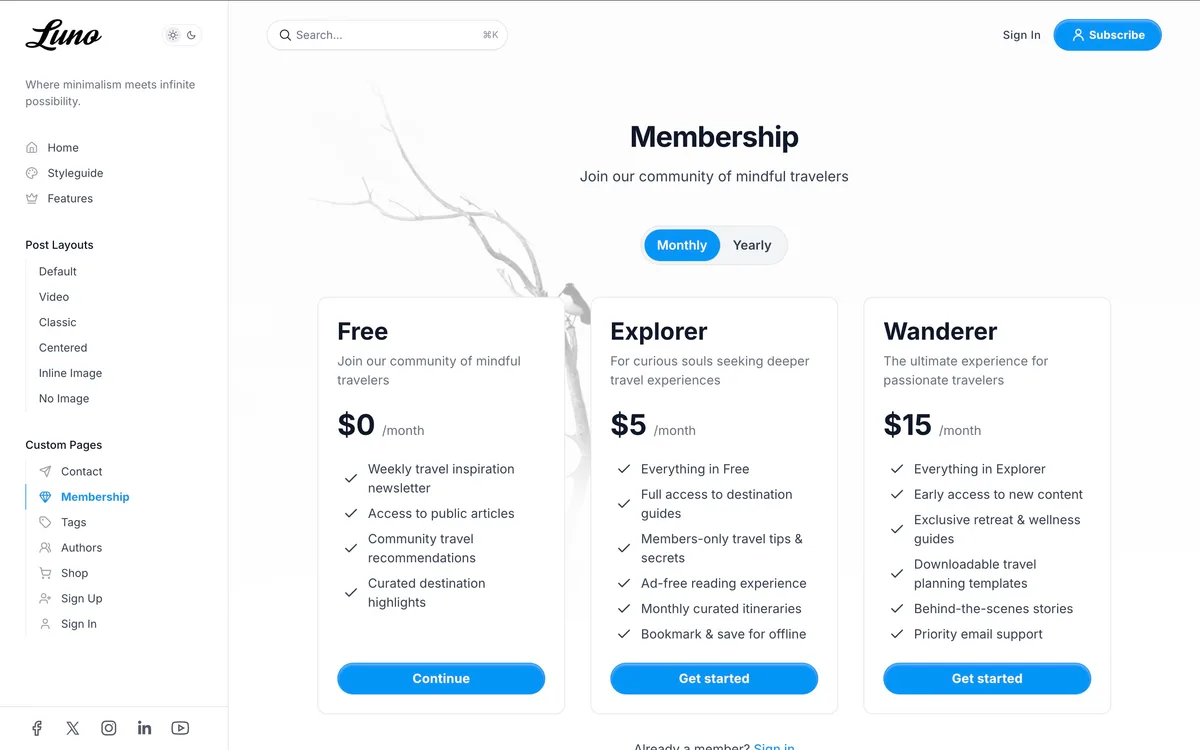
Our Luno theme includes dedicated membership sign-up pages, a table of contents for long posts, and five hero layouts, designed specifically for publishers who monetize through subscriptions.
For the full case for switching from WordPress, see our WordPress alternative guide.
Comparing every option? See our best blogging platforms ranking.
Frequently Asked Questions
Is Ghost better than WordPress for blogging and newsletters?
How much does Ghost cost compared to WordPress?
Does Ghost have built-in SEO or do you need plugins like Yoast?
Is Ghost more secure than WordPress?
Keep reading
Kit or Ghost: Email Only, or a Website Too?
Kit is an email tool; Ghost is a publishing platform with email built in. How that difference plays out in automation, SEO, design, paywalls and pricing.
Ghost vs Medium: Full Comparison for Writers
On Ghost you own your email list, set your prices and grow search traffic on your domain. Medium keeps your followers, pays from a pool and holds the rankings.
Ghost vs Substack: Fees, Features & Ownership
Ghost charges 0% revenue share; Substack takes 10% plus Apple in-app fees. Newsletters, design, SEO, pricing, and ownership compared side by side.
Ghost vs beehiiv: How to Actually Choose
Both take 0% of subscriptions, so it hinges on what you keep: Ghost gives ownership, design, and SEO at $29/mo; beehiiv sells growth, ads, and Boosts for $43.
Recommended Themes
Themes with at least one of the features this guide touches: membership pages, newsletter integration, SEO optimization and dark mode.

Tribune
Strongest hereTribune is the front page of a newspaper. Lead stories beside the day's picture, a Featured list at the edge, then your sections by topic, each in its own layout, under a masthead that folds away as the reader scrolls. Built for newspapers and multi-author magazines that publish several stories a day, and managed entirely from Ghost admin.

Luno
Strongest hereLuno is a blog that works like an app. A menu that stays open in a fixed sidebar, search a keystroke away, a light and dark switch beside your logo, and a homepage that opens with three featured stories as cover cards. Built for travel, lifestyle and product blogs whose readers expect an interface they already know, and managed entirely from Ghost admin.


Comparing options? Browse all premium Ghost themes side by side.
Get every theme in one bundle
The complete Luxe Themes bundle: every theme, one purchase.