 Luxe Themes
Ghost vs Webflow: Full Comparison
Webflow is a visual design tool. Ghost is a publishing platform. Compare newsletters, memberships, SEO, pricing, and design for content creators.
Quick answer: Choose Ghost if publishing is your business — built-in newsletters, 0%-fee memberships, and a writer-first editor from $15/mo. Choose Webflow if visual design is the deliverable — pixel-perfect layouts and animations, but you’ll add paid tools for newsletters and memberships. For a content site with email and paid tiers, Ghost is cheaper and simpler; for a design-led marketing site, Webflow wins.
Visual Design Tool vs Publishing Platform
Webflow builds visually complex websites. Ghost publishes content. This is not a minor distinction — it determines everything about each platform’s strengths and limitations.
Webflow is a visual web design tool that gives designers pixel-perfect control over layout, animation, and interaction without writing code. It excels at portfolios, agency websites, product landing pages, and marketing sites where visual design is the primary deliverable.
Ghost is a publishing platform designed for writers, bloggers, and newsletter publishers. It excels at email newsletters, paid memberships, SEO-optimized content, and audience building. The design is handled through professional themes, not a visual builder.
If you are building a design-forward website that also has a blog, Webflow is built for that. If publishing content and building an audience is your business, Ghost is built for that.
Newsletters
Ghost
Ghost’s newsletter system is native and included on every plan:
- Write a post and send it to subscribers’ inboxes in one action
- Multiple newsletters per site with independent subscriptions
- Segmentation by membership tier, label, or newsletter subscription
- Email-only content (send without publishing to the web)
- Custom email design: fonts, colors, buttons, headers
- Per-post analytics: open rates, click rates, per-link performance
- Unlimited sends on all plans at no additional cost
Webflow
Webflow has no built-in newsletter functionality. To email content to subscribers, you need a third-party tool:
- Mailchimp, ConvertKit, Beehiiv, or another email service
- Manual content duplication between Webflow CMS and your email tool
- Separate subscriber management across two platforms
- Additional monthly cost for the email service
- No integrated publish-and-send workflow
The integration gap is significant for content-focused businesses. Every newsletter requires recreating content in a separate tool, managing subscribers in two places, and paying for an additional service.
Memberships and Monetization
Ghost
Ghost has native paid memberships with 0% platform fee:
- Multiple custom tiers with your own pricing
- Per-post content access rules (free, paid, specific tier)
- Server-side content gating — member-only content is not accessible without authentication
- Direct Stripe connection — you own the billing relationship
- One-time payments and tips (Ghost 6.0)
- Revenue dashboard: MRR, churn, customer LTV
Webflow
Webflow launched Memberships as a paid add-on:
- Available on CMS and Business hosting plans
- Requires Webflow Memberships add-on ($25/month for up to 100 members)
- Scales to $70/month for 1,000 members, custom pricing above
- Stripe integration for payment processing
- Gated content pages and sections
- No tiered access based on subscription level in the same way Ghost handles it
The cost difference is meaningful. Ghost includes memberships on the Publisher plan ($29/month) with 0% platform fee and up to 1,000 members. Webflow charges $25-70+/month on top of the hosting plan just for the membership add-on.
SEO
Ghost
Full SEO toolkit built in:
- Auto-generated XML sitemap linked from robots.txt
- Schema.org structured data on every page
- Custom meta titles and descriptions per post
- Canonical URLs (auto-set, overridable)
- Open Graph and Twitter Card tags
- Redirect management and noindex controls
- Clean, semantic HTML with fast load times
Webflow
Webflow has solid SEO capabilities for a visual builder:
- Auto-generated XML sitemaps
- Editable meta titles and descriptions
- 301 redirect management
- Alt text for images
- Clean URL structures
- Open Graph settings
However, Webflow’s SEO has limitations related to its visual builder approach:
- Generated HTML can be heavier than purpose-built CMS output
- Complex interactions and animations can slow page load
- CMS items have fewer SEO controls than dedicated publishing platforms
- Schema.org structured data requires manual implementation via custom code
For content-heavy sites where SEO drives traffic, Ghost’s purpose-built markup produces cleaner, faster-loading pages with less effort.
Design
Webflow
Design is Webflow’s defining strength:
- Visual drag-and-drop builder with pixel-perfect control
- Custom animations, interactions, and scroll effects without code
- Flexbox and CSS Grid visual controls
- Component-based design system
- Design to live site — what you see is what you get
- 1,500+ templates and a marketplace for custom designs
For designers and agencies, Webflow is one of the most powerful visual builders available. You can create layouts that would require a front-end developer on any other platform.
Ghost
Ghost uses a professional theme system:
- Themes available through the Ghost Marketplace and third-party providers
- Complete visual control through HTML, CSS, and Handlebars templating
- Custom themes on Publisher plan+ (Starter limited to official themes)
- Purpose-built for publishing: hero sections, post layouts, membership pages

Our Homa theme shows what a purpose-built publishing theme looks like: dropdown navigation, a featured-posts section, a lightbox for images and galleries, and dark mode.
Ghost’s design flexibility is theme-level, not pixel-level. You choose or customize a theme rather than building layouts visually. For publishers, this is faster — install a theme and start writing. For designers who want full visual control, Webflow offers more.
Content Editor
Webflow
Webflow’s CMS is designed for structured content in a visual context. Content editing happens within the designer or the Editor view. Writers interact with CMS fields (title, body, images, metadata) that map to visual components.
This works well for structured content (product listings, team pages, case studies) but can feel heavy for pure writing. The editor is more like filling in a database form than writing in a focused environment.
Ghost
Ghost’s Koenig editor is built for writers:
- Clean, distraction-free writing interface
- Dynamic content cards: images, video, audio, bookmarks, embeds, code blocks, callouts
- Built-in Unsplash image search
- Markdown shortcuts for fast formatting
- Scheduling to specific date and time
- Multiple author support
For content-first workflows, Ghost’s editor is significantly more writing-friendly.
Pricing
Webflow (as of February 2026)
| Plan | Monthly Price | CMS Items | Notes |
|---|---|---|---|
| Basic | $18/mo | — | No CMS |
| CMS | $29/mo | 2,000 | Blog/CMS enabled |
| Business | $49/mo | 10,000 | Advanced features |
| Enterprise | Custom | Custom | Custom limits |
Add Webflow Memberships: +$25-70/month (based on member count) Add email service (Mailchimp, Kit, etc.): +$9-60+/month
For a Webflow site with blog, memberships, and email: CMS plan ($29) + Memberships add-on ($25+) + email service ($13+) = $67+/month minimum.
Ghost(Pro) (as of February 2026)
| Plan | Monthly (annual billing) | Members | Staff |
|---|---|---|---|
| Starter | $15/mo (annual) | 1,000 | 1 |
| Publisher | $29/mo | 1,000 | 3 |
| Business | $199/mo | 10,000 | 15 |
All plans: unlimited email sends, SSL, CDN, backups, free custom domain, 0% membership fees.
Ghost Publisher at $29/month includes everything Webflow charges $67+/month for across multiple services.
Feature Comparison
| Feature | Ghost | Webflow |
|---|---|---|
| Newsletter | Built-in, unlimited sends | Requires third-party tool |
| Paid memberships | 0% fee (Publisher plan) | Add-on ($25-70+/mo) |
| Visual builder | No | Yes (pixel-perfect) |
| Writing editor | Purpose-built for writers | CMS field-based |
| SEO | Full toolkit, auto-structured data | Good, some manual setup |
| Animations/interactions | Theme-level only | Full visual control |
| E-commerce | No | Yes (add-on) |
| Custom code | All plans (themes + code injection) | All plans |
| Self-hosting | Yes (MIT license) | No |
| Starting price | $15/mo (annual) | $18/mo |
Who Should Choose Webflow
- Visual design is the primary deliverable (agency, portfolio, product site)
- You need custom animations, scroll effects, and complex interactions
- Your blog is secondary to the overall website design
- You want pixel-perfect control without writing code
- You are a designer comfortable with Webflow’s learning curve
- E-commerce alongside content is part of your business
Who Should Choose Ghost
- Publishing content is your primary business
- You want newsletters and memberships without third-party add-ons
- A clean, focused writing experience matters more than visual design tools
- SEO-driven organic traffic is part of your strategy
- You want one platform for everything at a lower total cost
- Platform independence and open-source ownership matter
Your Publishing Foundation
Ghost themes are built specifically for publishing. Instead of assembling a content workflow from a visual builder plus email service plus membership tool, Ghost gives you everything in one platform with a professional theme on top.
Our themes include dark mode, 46+ languages, and multiple post layouts, starting at $69. Most also include their own membership pages.
Frequently Asked Questions
Is Ghost or Webflow better for a blog?
Does Webflow have newsletters and memberships like Ghost?
Is Ghost or Webflow cheaper?
Can I move my site between Ghost and Webflow?
Keep reading
Kit or Ghost: Email Only, or a Website Too?
Kit is an email tool; Ghost is a publishing platform with email built in. How that difference plays out in automation, SEO, design, paywalls and pricing.
Ghost vs Medium: Full Comparison for Writers
On Ghost you own your email list, set your prices and grow search traffic on your domain. Medium keeps your followers, pays from a pool and holds the rankings.
Ghost vs Substack: Fees, Features & Ownership
Ghost charges 0% revenue share; Substack takes 10% plus Apple in-app fees. Newsletters, design, SEO, pricing, and ownership compared side by side.
Ghost vs beehiiv: How to Actually Choose
Both take 0% of subscriptions, so it hinges on what you keep: Ghost gives ownership, design, and SEO at $29/mo; beehiiv sells growth, ads, and Boosts for $43.
Recommended Themes
Themes with at least one of the features this guide touches: membership pages, newsletter integration, SEO optimization and dark mode.
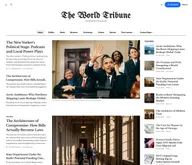
Tribune
Strongest hereTribune is the front page of a newspaper. Lead stories beside the day's picture, a Featured list at the edge, then your sections by topic, each in its own layout, under a masthead that folds away as the reader scrolls. Built for newspapers and multi-author magazines that publish several stories a day, and managed entirely from Ghost admin.

Luno
Strongest hereLuno is a blog that works like an app. A menu that stays open in a fixed sidebar, search a keystroke away, a light and dark switch beside your logo, and a homepage that opens with three featured stories as cover cards. Built for travel, lifestyle and product blogs whose readers expect an interface they already know, and managed entirely from Ghost admin.


Comparing options? Browse all premium Ghost themes side by side.
Get every theme in one bundle
The complete Luxe Themes bundle: every theme, one purchase.