 Luxe Themes
Ghost SEO: Built-in Features and What You Still Do
What Ghost does for search on its own, checked on a live site: sitemaps, structured data, canonicals, meta data, redirects, AI-search files, and your part.
Quick answer: Ghost handles the technical half of SEO without plugins: a sitemap, a robots file, canonical tags, structured data, social cards, and image resizing on upload. You handle the other half: titles and descriptions, the site-wide meta data, redirects when URLs change, and the content itself. This guide shows what each side looks like, checked on a live Ghost site.
If you are coming from WordPress, the first question is usually where the SEO plugin is. There isn’t one, and it takes a moment to trust that this is fine. Ghost builds the technical pieces a plugin would add into the platform itself. So the question changes from “which plugin do you install” to “what does Ghost already do, and what is left for you”.
This guide answers both, in that order. The sitemap, robots file and structured data in the first half we checked on one of our own Ghost sites in September 2026, by reading what the site actually serves, and we tested what happens to an old address when a slug changes. The rest we checked against Ghost’s documentation. The second half covers the settings you control, the two places people lose rankings by accident, and Ghost’s newer files for AI search. Our recommendation is short. Set the site-wide meta data once, write a real description for every post, handle redirects yourself when a URL changes, and spend the rest of your effort on the writing.
What Ghost does on its own
Ghost’s SEO help page lists the features. Here is what they look like on a real site.
A sitemap, in four parts. Every Ghost site serves a sitemap index at /sitemap.xml that points to separate sitemaps for posts, pages, authors and tags. It updates itself when you publish, edit or delete. Members-only and paid posts are listed too, by URL, because the sitemap describes what exists, not what a crawler can read. If the site is in private mode, the whole thing switches off and every page carries a no-index tag instead.
A robots file that already knows what to hide. The robots file at /robots.txt names the sitemap. It also tells crawlers to stay out of the admin, the email preview paths, the members API and Ghost’s tracking and analytics endpoints. On the site we checked it looked like this.
User-agent: *Sitemap: https://example.com/sitemap.xmlDisallow: /ghost/Disallow: /email/Disallow: /members/api/comments/counts/Disallow: /r/Disallow: /webmentions/receive/Disallow: /.ghost/analytics/api/A theme can ship its own robots file to replace this one. On Ghost(Pro), Ghost’s own hosted service, that is the only way to change it.
A canonical tag on every page. Each post, page, tag and author page declares its own address as the official one. A crawler arriving through a tracking parameter or a trailing-slash variant does not see a duplicate.
Structured data, in the form search engines prefer. Ghost writes a block of JSON-LD, the machine-readable summary Google reads, into every page. The site’s home page is described as a WebSite. Posts and pages are described as an Article, with the publisher as an Organization, each author as a Person, and each image as an ImageObject. Author pages are a Person. Tag pages are a Series. On the post we checked, that came to one Article, one Organization, three Person objects and five images, all generated from the post itself and the profile fields in admin.
Social cards with fallbacks. Open Graph tags for Facebook and a card for X are written for every page. If you never fill the social fields, Ghost uses the meta title and description, and if those are empty, the post title, excerpt and feature image.
Image resizing on upload. Ghost resizes images you upload through the editor to a maximum width of 2,000 pixels. It compresses JPEGs to 80 percent quality and strips their metadata, keeping the original alongside. On a self-hosted site this can be turned off in the config; on Ghost(Pro) it is always on. It is why a 6 MB phone photo does not make a Ghost page slow. The Ghost image sizes guide lists what to upload for each image slot.
RSS discovery and clean markup. Every page links to the RSS feed for crawlers and readers that look for one. The HTML itself, and therefore the heading structure and page speed, comes from the theme, which is the one part of this list Ghost cannot guarantee.
The settings you control
Site-wide meta data
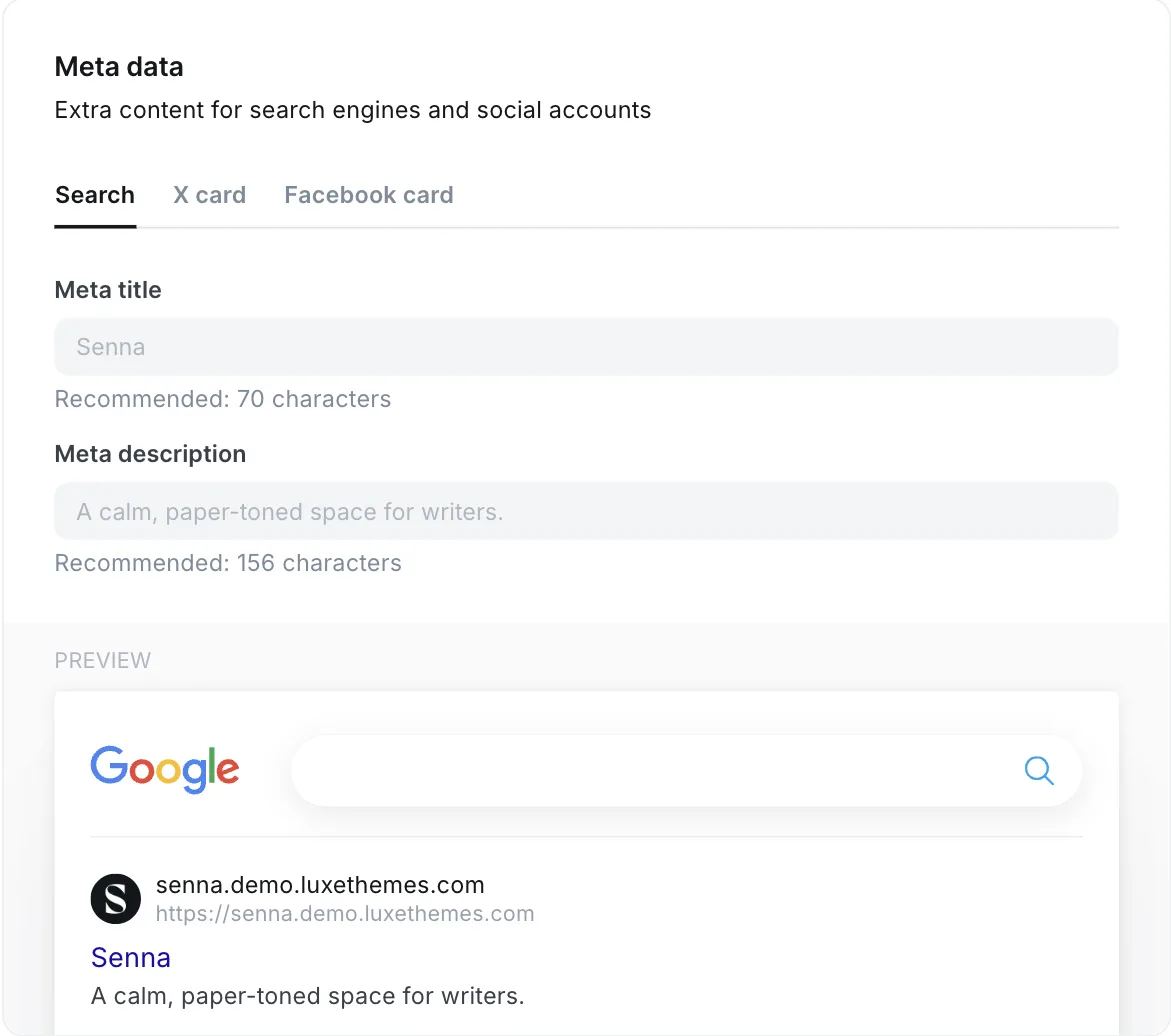
Under Settings → Meta data you set the meta title and description for the home page, with a preview of the search result as you type. Separate tabs hold the X card and the Facebook card. Ghost recommends up to 70 characters for the title and 156 for the description, which is roughly what fits in a result before it is cut off.
The social account links under Settings → Social accounts feed the structured data as well, so fill them in even if you never share a post yourself.
Per-post meta data, cards and canonical
Every post and page has the same fields in the settings sidebar, under Meta data. There is a meta title, a meta description, a canonical URL, and X and Facebook cards with their own title, description and image. Leave them blank and Ghost falls back to the post title and the excerpt. Write them when the post title is a headline rather than a description of the topic, which is most of the time. The Ghost editor guide covers where the sidebar lives.
The canonical URL field is for one case only: a post that was first published somewhere else, where the other copy should get the credit. Setting it has a side effect that Ghost’s own documentation states plainly: the post is removed from your sitemap. Do not use the field for anything else, and in particular do not paste the post’s own address into it.
Slugs and redirects
Ghost builds a post’s address from its title. You can change the slug in the sidebar at any time, and Ghost will not redirect the old address. We tried it on one of our own sites while writing this: the moment the slug changed, the old address returned a 404 and the new one served the post, with nothing in between. Anyone who follows the old link, including a search engine, gets that 404. This surprises people who come from platforms that add the redirect for them, and it is the most common way a Ghost site loses rankings by accident.
Redirects live in a file. In Settings → Advanced → Labs, on the Beta features tab, download the redirects file, add your rules, and upload it again. The file has two sections, one for permanent and one for temporary redirects.
301: /old-slug/: /new-slug/ /2024/12/old-structure/: /new-structure/302: /this-week/: /current-post/Use the permanent section for anything you moved for good, because that is the one that passes a page’s history to its new address. Indent with spaces, not tabs, or the upload is rejected. When you migrate from another platform, this file is where every old URL goes.
Tags, authors and member-only content
Tag and author pages are real pages to Ghost. They are in the sitemap, they carry structured data, and there is no switch to keep them out of search. For most sites that is fine, because a tag page is a useful landing page for a topic. If you use tags as internal organisation and would rather they were not indexed, the theme has to add a robots meta tag on the tag template. There is no admin setting for it.
Member-only and paid posts are handled the way you would hope. Their URLs appear in the sitemap and their public part, the title, the excerpt and anything above the paywall, is what a crawler sees. The protected text is not served to search engines at all, so nothing leaks, and nothing behind the paywall helps you rank either. If a post needs to be found, give it a public opening above the paywall marker.
Search Console and analytics
Ghost does not submit anything to search engines on its own. Add the site to Google Search Console and Bing Webmaster Tools yourself, and submit the sitemap address once. From then on the sitemap updates itself and the crawlers pick up changes on their own schedule.
For measuring what search sends you, Ghost 6 has its own web analytics on Ghost(Pro), and on a self-hosted site when it is switched on. It records visits and referrers without a cookie banner. If you want Google Analytics or a privacy-focused alternative instead, paste its snippet under Settings → Code injection in the site header. Our analytics setup guide compares the options, and the code injection guide covers what else that box can do.
AI search: the files Ghost can publish for it
AI assistants that answer questions with citations read sites differently from a crawler. Ghost added support for that in the summer of 2026. When the option under Settings → Meta data is on, the site publishes two files at its root: llms.txt with an index of your content and llms-full.txt with the text. It also serves a plain-text version of any public post when .md is added to its address. Only public content is included; members-only and paid posts appear by title and excerpt with the protected part left out, and a private site publishes nothing.
Ghost’s announcement notes that the option is off for existing sites until you turn it on. There is no harm in turning it on, and no evidence yet of how much it helps, so we would switch it on and not think about it further.
What Ghost does not do
It is worth being clear about the gaps, because most of them are things a WordPress plugin would have done for you.
- No keyword research or content scoring. Ghost will not tell you what to write about or grade a draft. Use an external tool, or your search console data.
- No automatic redirects when you change a slug or delete a post. The redirects file above is the whole mechanism.
- No per-page no-index setting. Private mode is all or nothing, and tag and author pages are always in.
- No broken-link checking. Any site crawler will do it; Ghost has no opinion.
- No control over structured data from admin. It is generated from the content, which is usually what you want.
For the theme developer
If you build or modify a theme, two details matter. The first is that the theme decides the heading structure and the speed of the page, which together are most of what Ghost’s built-ins cannot do for you. That means one H1 per page, headings in order, and no unused libraries loaded on every page. The second is that Ghost’s head helper can leave out its own structured data if the theme provides better data of its own. For the technical reader: {{ghost_head exclude="schema"}} drops the JSON-LD block, and the helper also accepts metadata and social_data in the same list. Add extra types such as FAQ or breadcrumb data freely, but do not emit a second Article for the same page. When two blocks describe the same thing with different values, search engines tend to ignore one or flag the inconsistency.
Where this leaves you
Ghost has done the technical half and will keep doing it as you publish. Your half is the site-wide meta data, a description for every post, the redirects file whenever a URL changes, and the writing. If you want to see how search is treating the site, the analytics setup guide is the next step. If the heading structure and speed of your theme are the open question, our Ghost themes keep one heading hierarchy, load no page-wide libraries, and leave Ghost’s structured data untouched.
Frequently Asked Questions
Is Ghost good for SEO?
Do I need an SEO plugin for Ghost?
How do I set meta titles and descriptions in Ghost?
Are tag and author pages indexed in Ghost?
Keep reading
What You Can Change in a Ghost Theme Without Code
Four layers of Ghost customisation, from settings to a custom theme, what each can and cannot change, and how to tell before buying which layer your idea needs.
Update a Ghost Theme Without Losing Your Settings
Ghost identifies a theme by the name of the zip you upload. Same name, and your settings survive the update. We tested what survives and what does not.
Ghost Portal Guide: Settings, Links & Customization
How Ghost's Portal works and how to shape it: signup options, default billing cycle, the floating button, every Portal link and data attribute, translation.
Ghost Analytics: Built-In and Third-Party
Set up Ghost 6 native analytics (Tinybird), fix the empty Traffic dashboard on self-hosted installs, and add GA4 or privacy-focused tools via code injection.
Recommended Themes
Themes with at least one of the features this guide touches: SEO optimization, structured data, membership pages and newsletter integration.
Tribune
Strongest hereTribune is the front page of a newspaper. Lead stories beside the day's picture, a Featured list at the edge, then your sections by topic, each in its own layout, under a masthead that folds away as the reader scrolls. Built for newspapers and multi-author magazines that publish several stories a day, and managed entirely from Ghost admin.
Luno
Strongest hereLuno is a blog that works like an app. A menu that stays open in a fixed sidebar, search a keystroke away, a light and dark switch beside your logo, and a homepage that opens with three featured stories as cover cards. Built for travel, lifestyle and product blogs whose readers expect an interface they already know, and managed entirely from Ghost admin.


Comparing options? Browse all premium Ghost themes side by side.
Get every theme in one bundle
The complete Luxe Themes bundle: every theme, one purchase.