 Luxe Themes
Using Ghost as a Headless CMS
Ghost Content API delivers your content as JSON. Build custom frontends with Next.js, Nuxt, Astro, or any framework while using Ghost for content management.
Ghost Beyond Themes
Ghost is typically used as a full publishing platform — content management, rendering, newsletters, and memberships all in one. But Ghost also works as a headless CMS, delivering content through APIs while you build a custom frontend in any framework.
This approach gives you Ghost’s editor, content organization, and member management with complete control over the presentation layer.
Ghost’s APIs
Ghost provides two APIs:
Content API (Read-Only)
The Content API delivers published content as JSON. It is available on all Ghost plans, including Starter.
Base URL: https://yourdomain.com/ghost/api/content/
Authentication: Content API key (found in Ghost Admin → Integrations → Add custom integration)
Available endpoints:
| Endpoint | Returns |
|---|---|
/posts/ | Published posts with content, tags, authors |
/pages/ | Published pages |
/tags/ | All tags with metadata |
/authors/ | Author profiles |
/settings/ | Site title, description, navigation, etc. |
/tiers/ | Membership tier information |
/newsletters/ | Newsletter configuration |
Filtering and pagination:
GET /ghost/api/content/posts/?key=YOUR_KEY&limit=10&page=1GET /ghost/api/content/posts/?key=YOUR_KEY&filter=tag:tutorialsGET /ghost/api/content/posts/?key=YOUR_KEY&include=tags,authorsGET /ghost/api/content/posts/?key=YOUR_KEY&fields=title,slug,excerptThe Content API supports filtering by tag, author, visibility, and custom fields. Pagination follows standard cursor-based patterns.
Admin API (Read-Write)
The Admin API allows creating, editing, and deleting content programmatically. It requires Ghost(Pro) Publisher or higher.
Authentication: Admin API key (JWT-based authentication)
Capabilities:
- Create and update posts and pages
- Manage tags and authors
- Upload images
- Manage members (read member data, add labels)
- Access webhooks and integrations
The Admin API enables workflows like:
- Automated content publishing from external sources
- Member data synchronization with CRMs
- Content migration scripts
- Automated social media posting triggered by new posts
Building a Headless Frontend
Why Go Headless?
Reasons to use Ghost as a headless CMS instead of using Ghost themes:
- Custom frontend framework: You want to build with React, Vue, Svelte, or another framework
- Static site generation: Pre-render pages for maximum performance using Next.js, Nuxt, or Astro
- Multi-channel publishing: Same content delivered to web, mobile app, and other platforms
- Complex layouts: Your design requirements exceed what Handlebars templates can achieve
- Existing infrastructure: Ghost fits into an existing tech stack as the content layer
Why Stay With Themes
Reasons to use Ghost’s built-in theme system instead:
- Faster setup: Install a theme and start publishing immediately
- Newsletter integration: Themes render consistently in both web and email
- Membership pages: Ghost’s Portal gives every theme sign-up, sign-in, and account screens, and many themes add their own pricing and sign-in pages
- SEO defaults: Ghost’s rendering engine handles structured data, sitemaps, and meta tags automatically
- Lower maintenance: No separate frontend to build, deploy, and maintain
If your primary goal is publishing content with newsletters and memberships, the theme approach is simpler and more feature-complete. Headless is for projects that need custom frontend architecture, not for adding one missing feature; for that, the Ghost plugins guide covers lighter routes such as integrations and code injection.
Next.js Example
Ghost provides an official JavaScript SDK (@tryghost/content-api) for the Content API:
import GhostContentAPI from '@tryghost/content-api';
const api = new GhostContentAPI({  url: 'https://yourdomain.com',  key: 'your_content_api_key',  version: 'v5.0'});
// Fetch all postsconst posts = await api.posts.browse({  limit: 'all',  include: 'tags,authors'});
// Fetch a single post by slugconst post = await api.posts.read({  slug: 'my-post-slug'}, {  include: 'tags,authors'});
In a Next.js app with static site generation:
export async function getStaticPaths() {  const posts = await api.posts.browse({ limit: 'all', fields: 'slug' });  return {    paths: posts.map(post => ({ params: { slug: post.slug } })),    fallback: false  };}
export async function getStaticProps({ params }) {  const post = await api.posts.read({ slug: params.slug }, { include: 'tags,authors' });  return { props: { post } };}
Astro Example
Astro’s static-first approach pairs well with Ghost as a headless CMS:
---import GhostContentAPI from '@tryghost/content-api';
const api = new GhostContentAPI({  url: import.meta.env.GHOST_URL,  key: import.meta.env.GHOST_KEY,  version: 'v5.0'});
export async function getStaticPaths() {  const posts = await api.posts.browse({ limit: 'all', fields: 'slug' });  return posts.map(post => ({ params: { slug: post.slug } }));}
const { slug } = Astro.params;const post = await api.posts.read({ slug }, { include: 'tags,authors' });---
<article>  <h1>{post.title}</h1>  <div set:html={post.html} /></article>
Nuxt, Gatsby, and Others
The @tryghost/content-api SDK works in any JavaScript environment. For non-JavaScript frameworks (Ruby, Python, Go), use the REST API directly — it returns standard JSON.
Headless Considerations
SEO Responsibility
When using Ghost headlessly, you are responsible for:
- Generating XML sitemaps
- Adding structured data (JSON-LD) to pages
- Setting canonical URLs
- Configuring Open Graph and Twitter Card tags
- Creating robots.txt
Ghost’s built-in rendering handles all of this automatically. Going headless means reimplementing these features in your frontend.
Membership and Newsletters
Ghost’s membership portal and newsletter sending still work in headless mode — they are server-side features that do not depend on the frontend theme. However:
- You need to integrate Ghost’s Portal widget into your custom frontend for member signup/login
- Newsletter emails are sent by Ghost regardless of how the frontend is built
- Content gating (showing/hiding content based on membership) must be handled in your frontend code
Webhooks for Real-Time Updates
Ghost supports webhooks that fire when content changes:
- Post published, updated, or deleted
- Page published, updated, or deleted
- Member added, updated, or deleted
- Tag created, updated, or deleted
Use webhooks to trigger static site rebuilds, cache invalidation, or external service updates when content changes in Ghost.
Content Delivery
For static sites, content is fetched at build time and pre-rendered. For dynamic sites, content is fetched on each request (or with caching). Consider:
- Build time: Static generation with incremental rebuilds (ISR in Next.js)
- CDN caching: Cache API responses at the CDN level for dynamic sites
- Rate limits: Ghost(Pro) has API rate limits — batch requests during builds
Ghost vs Dedicated Headless CMS
How Ghost compares to purpose-built headless CMS platforms:
| Feature | Ghost | Contentful | Sanity | Strapi |
|---|---|---|---|---|
| Content editor | Excellent (writer-focused) | Good (structured) | Good (customizable) | Good (admin panel) |
| Newsletter sending | Built-in | No | No | No |
| Memberships | Built-in | No | No | No |
| Self-hosting | Yes (MIT) | No | Partial | Yes |
| Price | $15-29/mo (Pro) | $300+/mo (paid) | $99+/mo (paid) | Free (self-hosted) |
| Content model | Fixed (posts, pages, tags) | Fully custom | Fully custom | Fully custom |
| API | REST only | REST + GraphQL | GROQ + GraphQL | REST + GraphQL |
Ghost’s content model is fixed — posts, pages, tags, and authors. Dedicated headless CMS platforms allow fully custom content models (define your own content types, fields, and relationships). If you need custom content types beyond articles, a dedicated headless CMS may be more appropriate.
Ghost’s advantage: it includes newsletters and memberships that no dedicated headless CMS provides natively.
When to Go Headless
Go headless when:
- You have a development team that can build and maintain a custom frontend
- Your project needs custom content types or complex data relationships
- You are building a multi-platform experience (web + mobile app)
- Your frontend requirements exceed what Handlebars themes can provide
Stay with Ghost themes when:
- Publishing is your primary activity (not frontend development)
- You want newsletters, memberships, and SEO handled automatically
- You need to be publishing within days, not weeks
- Maintenance simplicity is a priority
Theme-Based Publishing
For publishers who want Ghost’s full feature set without building a custom frontend, a premium theme provides the design flexibility you need.
Our themes are built specifically for Ghost’s native rendering, starting at $69.
Frequently Asked Questions
Can Ghost be used as a headless CMS?
What is the Ghost Content API and how do you access it?
Which frameworks work with Ghost as a headless CMS?
When should you go headless versus staying with Ghost themes?
Keep reading
What You Can Change in a Ghost Theme Without Code
Four layers of Ghost customisation, from settings to a custom theme, what each can and cannot change, and how to tell before buying which layer your idea needs.
Update a Ghost Theme Without Losing Your Settings
Ghost identifies a theme by the name of the zip you upload. Same name, and your settings survive the update. We tested what survives and what does not.
Ghost SEO: Built-in Features and What You Still Do
What Ghost does for search on its own, checked on a live site: sitemaps, structured data, canonicals, meta data, redirects, AI-search files, and your part.
Ghost Portal Guide: Settings, Links & Customization
How Ghost's Portal works and how to shape it: signup options, default billing cycle, the floating button, every Portal link and data attribute, translation.
Recommended Themes
Themes with at least one of the features this guide touches: SEO optimization, structured data, membership pages and newsletter integration.
Tribune
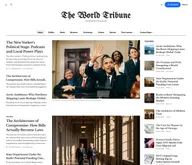
Strongest hereTribune is the front page of a newspaper. Lead stories beside the day's picture, a Featured list at the edge, then your sections by topic, each in its own layout, under a masthead that folds away as the reader scrolls. Built for newspapers and multi-author magazines that publish several stories a day, and managed entirely from Ghost admin.
Luno
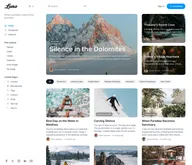
Strongest hereLuno is a blog that works like an app. A menu that stays open in a fixed sidebar, search a keystroke away, a light and dark switch beside your logo, and a homepage that opens with three featured stories as cover cards. Built for travel, lifestyle and product blogs whose readers expect an interface they already know, and managed entirely from Ghost admin.


Comparing options? Browse all premium Ghost themes side by side.
Get every theme in one bundle
The complete Luxe Themes bundle: every theme, one purchase.